Galileo를 사용한 에이전트 관측 가능성과 평가
Galileo는 AI 애플리케이션을 위한 평가 및 관측 가능성 플랫폼으로, 엔드투엔드 트레이싱, 평가, 모니터링을 제공합니다. Galileo는 에이전트 실행, 도구 호출, 모델 요청에 대해 ADK에서 직접 보내는 OpenTelemetry(OTel) 트레이스 수집을 지원합니다.
자세한 내용은 Galileo의 Google ADK 통합 문서를 참고하세요.
전제 조건
- Galileo API 키
- Galileo Project 및 Log stream
- Gemini API 키
종속성 설치
선택적으로 완성된 예제의
requirements.txt를 사용할 수도 있습니다.
환경 변수 설정
환경 변수를 구성합니다.
my_agent/.env
# Gemini 환경 변수
GOOGLE_GENAI_USE_VERTEXAI=0
GOOGLE_API_KEY="YOUR_API_KEY"

# Galileo 환경 변수
GALILEO_API_KEY="YOUR_API_KEY"
GALILEO_PROJECT="YOUR_PROJECT"
GALILEO_LOG_STREAM="YOUR_LOG_STREAM"
OpenTelemetry 구성(필수)
스팬이 Galileo로 전송되도록 하려면 어떤 ADK 구성 요소보다 먼저 OTLP exporter를 구성하고 전역 tracer provider를 설정해야 합니다.
# my_agent/agent.py

from dotenv import load_dotenv

load_dotenv()

# OpenTelemetry imports
from opentelemetry.sdk import trace as trace_sdk

# Galileo span processor (auto-configures OTLP headers & endpoint from env vars)
from galileo import otel

# OpenInference instrumentation for ADK
from openinference.instrumentation.google_adk import GoogleADKInstrumentor

# Create tracer provider and register Galileo span processor
tracer_provider = trace_sdk.TracerProvider()
galileo_span_processor = otel.GalileoSpanProcessor()
tracer_provider.add_span_processor(galileo_span_processor)

# Instrument Google ADK with OpenInference (this captures inputs/outputs)
GoogleADKInstrumentor().instrument(tracer_provider=tracer_provider)
예시: ADK 에이전트 추적
이제 OTLP exporter와 tracer provider를 설정하는 코드 뒤에 간단한 현재 시각 에이전트 코드를 추가할 수 있습니다.
# my_agent/agent.py

from google.adk.agents import Agent

def get_current_time(city: str) -> dict:
    """Returns the current time in a specified city."""
    return {"status": "success", "city": city, "time": "10:30 AM"}


root_agent = Agent(
    model="gemini-3-flash-preview",
    name="root_agent",
    description="Tells the current time in a specified city.",
    instruction=(
        "You are a helpful assistant that tells the current time in cities. "
        "Use the 'get_current_time' tool for this purpose."
    ),
    tools=[get_current_time],
)
다음 명령으로 에이전트를 실행합니다.
그리고 질문을 입력합니다.
완성된 예제는 Google ADK + OpenTelemetry Example Project를 참고하세요.
Galileo에서 트레이스 보기
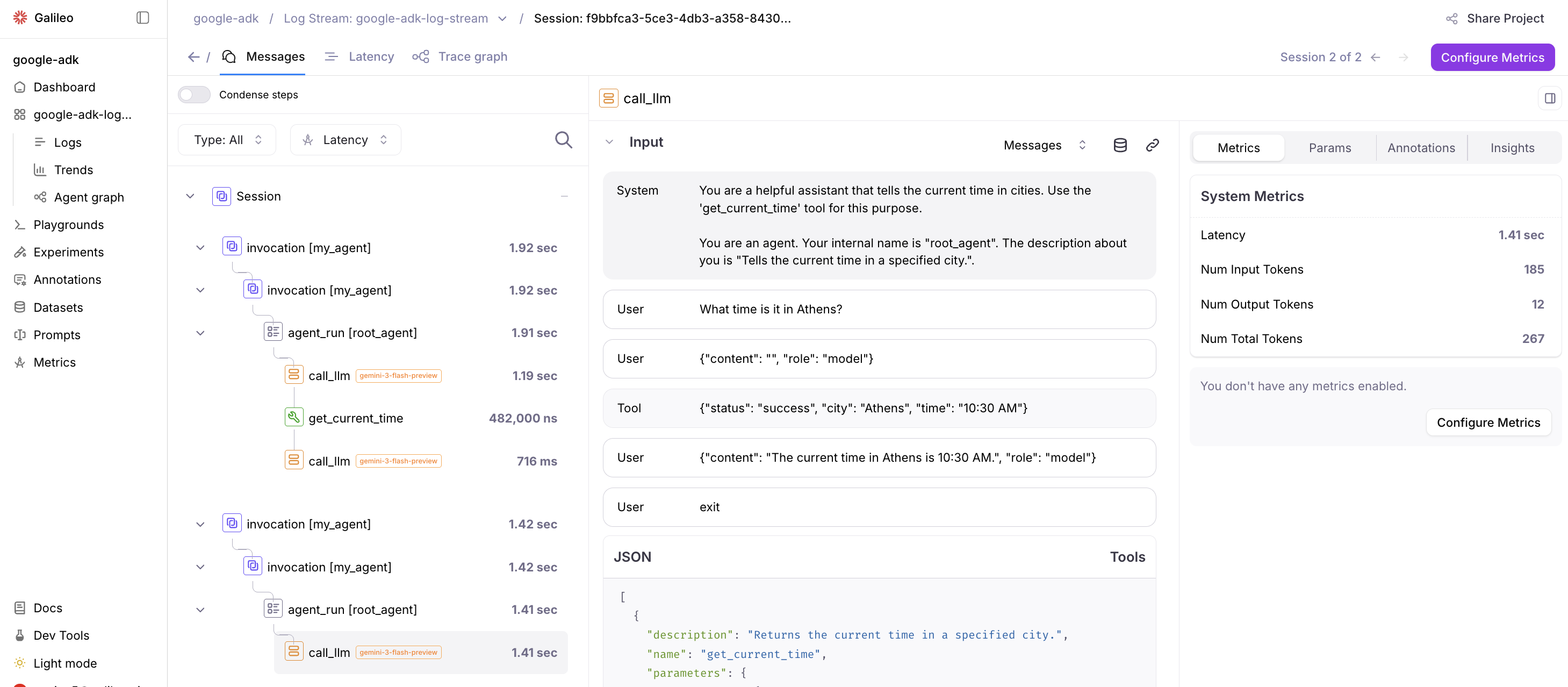
Project를 선택한 뒤 Log Stream에서 트레이스와 스팬을 확인합니다.
리소스
- Galileo Google ADK Integration Documentation: OpenTelemetry와 OpenInference를 사용해 Google ADK 프로젝트를 Galileo와 통합하는 공식 문서입니다.
- Google ADK + OpenTelemetry Example Project: Google ADK에서 Galileo를 사용하는 예제 프로젝트입니다. 이 예제는 Galileo 계측을 추가한 완성형 Google ADK Python Quickstart입니다.