ADK용 MLflow observability
Supported in ADKPython
MLflow Tracing은 OpenTelemetry(OTel) 트레이스 수집을 일급으로 지원합니다. Google ADK는 에이전트 실행, 도구 호출, 모델 요청에 대한 OTel span을 내보내며, 이를 MLflow Tracking Server로 직접 전송해 분석 및 디버깅할 수 있습니다.
사전 준비 사항
- MLflow 3.6.0 이상. OpenTelemetry 수집은 MLflow 3.6.0+에서만 지원됩니다.
- SQL 기반 백엔드 스토어(예: SQLite, PostgreSQL, MySQL). 파일 기반 스토어는 OTLP 수집을 지원하지 않습니다.
- 환경에 Google ADK가 설치되어 있어야 합니다.
의존성 설치
MLflow Tracking Server 시작
SQL 백엔드와 포트(예시: 5000)로 MLflow를 시작합니다:
--backend-store-uri는 PostgreSQL, MySQL, MSSQL 등 다른 SQL 백엔드로도 지정할 수 있습니다.
OTLP 수집은 파일 기반 백엔드에서는 지원되지 않습니다.
OpenTelemetry 구성(필수)
ADK 컴포넌트를 사용하기 전에 OTLP exporter를 구성하고 전역 tracer provider를 설정해야 span이 MLflow로 전송됩니다.
ADK 에이전트/도구를 import하거나 생성하기 전에, 코드에서 OTLP exporter와 전역 tracer provider를 초기화하세요:
# my_agent/agent.py
from opentelemetry import trace
from opentelemetry.exporter.otlp.proto.http.trace_exporter import OTLPSpanExporter
from opentelemetry.sdk.trace import TracerProvider
from opentelemetry.sdk.trace.export import SimpleSpanProcessor

exporter = OTLPSpanExporter(
    endpoint="http://localhost:5000/v1/traces",
    headers={"x-mlflow-experiment-id": "123"}  # replace with your experiment id
)

provider = TracerProvider()
provider.add_span_processor(SimpleSpanProcessor(exporter))
trace.set_tracer_provider(provider)  # set BEFORE importing/using ADK
이렇게 하면 OpenTelemetry 파이프라인이 구성되며, 실행 시마다 ADK span이 MLflow 서버로 전송됩니다.
예시: ADK 에이전트 추적
이제 OTLP exporter와 tracer provider를 설정하는 코드 뒤에, 간단한 수학 에이전트 코드를 추가할 수 있습니다:
# my_agent/agent.py
from google.adk.agents import LlmAgent
from google.adk.tools import FunctionTool


def calculator(a: float, b: float) -> str:
    """Add two numbers and return the result."""
    return str(a + b)


calculator_tool = FunctionTool(func=calculator)

root_agent = LlmAgent(
    name="MathAgent",
    model="gemini-2.0-flash-exp",
    instruction=(
        "You are a helpful assistant that can do math. "
        "When asked a math problem, use the calculator tool to solve it."
    ),
    tools=[calculator_tool],
)
다음 명령으로 에이전트를 실행합니다:
수학 문제를 질의합니다:
다음과 유사한 출력이 표시됩니다:
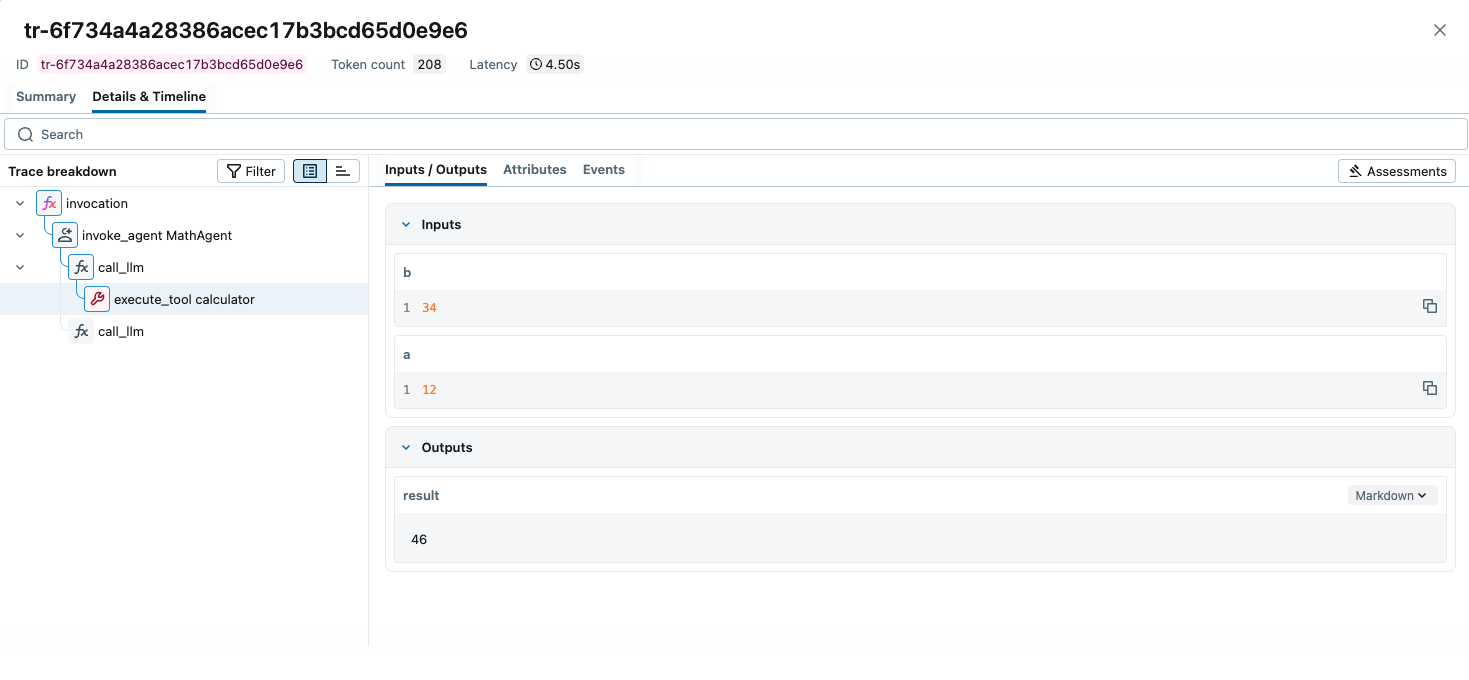
MLflow에서 트레이스 보기
http://localhost:5000에서 MLflow UI를 열고, 실험을 선택한 뒤
ADK 에이전트가 생성한 trace tree와 span을 확인하세요.
팁
- ADK 객체를 import/초기화하기 전에 tracer provider를 설정해야 모든 span이 수집됩니다.
- 프록시 뒤 또는 원격 호스트에서는
localhost:5000대신 서버 주소를 사용하세요.
리소스
- MLflow Tracing Documentation: 다른 라이브러리 통합 및 평가/모니터링/검색 등 트레이스의 다운스트림 활용까지 다루는 공식 문서.
- OpenTelemetry in MLflow: MLflow에서 OpenTelemetry를 사용하는 상세 가이드.
- MLflow for Agents: 프로덕션급 에이전트 구축을 위한 MLflow 종합 가이드.