Part 4: RunConfig 이해하기
Part 3에서는 run_live()에서 전달되는 이벤트를 처리해 모델 응답, 도구 호출,
스트리밍 업데이트를 다루는 방법을 배웠습니다.
이번 파트에서는 RunConfig를 통해 스트리밍 세션을 설정하는 방법을 설명합니다.
응답 형식 제어, 세션 수명 주기 관리, 운영 제약 적용이 핵심입니다.
이번 파트에서 배우는 내용:
응답 모달리티와 제약, BIDI/SSE 스트리밍 모드 차이,
ADK Session과 Live API 세션의 관계,
세션 재개 및 컨텍스트 윈도우 압축을 통한 세션 시간 관리,
동시 세션 쿼터 대응 아키텍처,
max_llm_calls와 오디오 저장 옵션 기반 비용 제어를 다룹니다.
더 알아보기
오디오/비디오 관련 RunConfig 상세는
Part 5: Audio, Image and Video in Live API를 참고하세요.
RunConfig 파라미터 빠른 참조
아래 표는 이번 파트에서 다루는 RunConfig 파라미터를 빠르게 확인하기 위한 요약입니다.
| Parameter | Type | Purpose | Platform Support | Reference |
|---|---|---|---|---|
| response_modalities | list[str] | 출력 형식 제어(TEXT 또는 AUDIO) | Both | Details |
| streaming_mode | StreamingMode | BIDI 또는 SSE 모드 선택 | Both | Details |
| session_resumption | SessionResumptionConfig | 자동 재연결 활성화 | Both | Details |
| context_window_compression | ContextWindowCompressionConfig | 세션 시간 무제한화 | Both | Details |
| max_llm_calls | int | 세션당 LLM 호출 수 제한 | Both | Details |
| save_live_blob | bool | 오디오/비디오 스트림 영속화 | Both | Details |
| custom_metadata | dict[str, Any] | invocation 이벤트에 메타데이터 부착 | Both | Details |
| support_cfc | bool | 조합형 함수 호출 활성화 | Gemini (2.x models only) | Details |
| speech_config | SpeechConfig | 음성/언어 설정 | Both | Part 5: Voice Configuration |
| input_audio_transcription | AudioTranscriptionConfig | 사용자 음성 전사 | Both | Part 5: Audio Transcription |
| output_audio_transcription | AudioTranscriptionConfig | 모델 음성 전사 | Both | Part 5: Audio Transcription |
| realtime_input_config | RealtimeInputConfig | VAD 설정 | Both | Part 5: Voice Activity Detection |
| proactivity | ProactivityConfig | 능동 오디오 활성화 | Gemini (native audio only) | Part 5: Proactivity and Affective Dialog |
| enable_affective_dialog | bool | 감정 적응 | Gemini (native audio only) | Part 5: Proactivity and Affective Dialog |
Source Reference
플랫폼 지원 범례:
- Both: Gemini Live API와 Vertex AI Live API 모두 지원
- Gemini: Gemini Live API에서만 지원
- Model-specific: 특정 모델 아키텍처 필요(예: native audio)
Import 경로:
위 표에 나온 구성 타입 클래스는 모두 google.genai.types에서 import합니다.
from google.genai import types
from google.adk.agents.run_config import RunConfig, StreamingMode

# 구성 타입은 types 모듈을 통해 접근
run_config = RunConfig(
    session_resumption=types.SessionResumptionConfig(),
    context_window_compression=types.ContextWindowCompressionConfig(...),
    speech_config=types.SpeechConfig(...),
    # etc.
)
RunConfig 클래스와 StreamingMode enum은 google.adk.agents.run_config에서 import합니다.
Response Modalities
응답 모달리티는 모델 출력 형식(텍스트/오디오)을 제어합니다. Gemini Live API와 Vertex AI Live API 모두 세션당 하나의 모달리티만 허용합니다.
설정 예시:
# Phase 2: Session initialization - RunConfig determines streaming behavior

# 기본 동작: response_modalities 미지정 시 ADK가 ["AUDIO"]로 자동 설정
# (native audio 모델에서 명시적 모달리티가 필요)
run_config = RunConfig(
    streaming_mode=StreamingMode.BIDI  # Bidirectional WebSocket communication
)

# 위 설정은 다음과 동일
run_config = RunConfig(
    response_modalities=["AUDIO"],  # Automatically set by ADK in run_live()
    streaming_mode=StreamingMode.BIDI  # Bidirectional WebSocket communication
)

# ✅ 올바른 예: 텍스트 전용 응답
run_config = RunConfig(
    response_modalities=["TEXT"],
    streaming_mode=StreamingMode.BIDI
)

# ✅ 올바른 예: 오디오 전용 응답
run_config = RunConfig(
    response_modalities=["AUDIO"],
    streaming_mode=StreamingMode.BIDI
)
양 플랫폼 모두 세션당 단일 응답 모달리티만 허용합니다. 둘 다 지정하면 API 오류가 발생합니다.
# ❌ 잘못된 예: 두 모달리티 동시 사용 불가
run_config = RunConfig(
    response_modalities=["TEXT", "AUDIO"],  # ERROR
    streaming_mode=StreamingMode.BIDI
)
# Error from Live API: "Only one response modality is supported per session"
기본 동작:
response_modalities를 지정하지 않으면 run_live()에서 자동으로 ["AUDIO"]가 적용됩니다.
필요하면 response_modalities=["TEXT"]로 명시적으로 덮어쓸 수 있습니다.
핵심 제약:
- 세션 시작 시
TEXT또는AUDIO중 하나를 선택해야 하며, 세션 중간 전환은 불가 - Native Audio 모델에는
AUDIO선택 필요 (오디오+텍스트가 모두 필요하면 Audio Transcript 기능 사용) - 응답 모달리티는 출력에만 영향 (입력은 모델이 지원하는 한 텍스트/음성/비디오 모두 가능)
StreamingMode: BIDI 또는 SSE
ADK는 서로 다른 API 엔드포인트/프로토콜을 사용하는 2개 스트리밍 모드를 지원합니다.
StreamingMode.BIDI: ADK가 WebSocket으로 Live API(live.connect())에 연결StreamingMode.SSE: ADK가 HTTP 스트리밍으로 표준 Gemini API(generate_content_async())에 연결
여기서 Live API는 양방향 WebSocket 엔드포인트를, 표준 Gemini API는 전통적인 HTTP 기반 엔드포인트를 의미합니다. 둘 다 Gemini API 플랫폼의 일부지만 프로토콜과 기능이 다릅니다.
참고: 이 모드는 ADK↔Gemini API 통신 프로토콜을 의미하며, 클라이언트-facing 아키텍처(WebSocket 서버/REST/SSE 등)와는 별개입니다.
이 가이드는 실시간 오디오/비디오에 필요한 StreamingMode.BIDI 중심으로 설명하지만,
용도에 맞게 BIDI/SSE 차이를 이해하는 것이 중요합니다.
from google.adk.agents.run_config import RunConfig, StreamingMode

# 실시간 오디오/비디오용 BIDI
run_config = RunConfig(
    streaming_mode=StreamingMode.BIDI,
    response_modalities=["AUDIO"]
)

# 텍스트 기반 상호작용용 SSE
run_config = RunConfig(
    streaming_mode=StreamingMode.SSE,
    response_modalities=["TEXT"]
)
프로토콜/구현 차이
BIDI는 송수신 동시 처리(받으면서 보내기)가 가능해 중단(interruption), 라이브 오디오 스트리밍, 즉시 턴 전환 같은 실시간 기능에 적합합니다. SSE는 요청을 먼저 완성해 보내고 응답 스트림을 받는 전통적 패턴입니다.
StreamingMode.BIDI - 양방향 WebSocket 통신:
sequenceDiagram
    participant App as Your Application
    participant ADK as ADK
    participant Queue as LiveRequestQueue
    participant Gemini as Gemini Live API

    Note over ADK,Gemini: Protocol: WebSocket

    App->>ADK: runner.run_live(run_config)
    ADK->>Gemini: live.connect() - WebSocket
    activate Gemini

    Note over ADK,Queue: Can send while receiving

    App->>Queue: send_content(text)
    Queue->>Gemini: → Content (via WebSocket)
    App->>Queue: send_realtime(audio)
    Queue->>Gemini: → Audio blob (via WebSocket)

    Gemini-->>ADK: ← Partial response (partial=True)
    ADK-->>App: ← Event: partial text/audio
    Gemini-->>ADK: ← Partial response (partial=True)
    ADK-->>App: ← Event: partial text/audio

    App->>Queue: send_content(interrupt)
    Queue->>Gemini: → New content

    Gemini-->>ADK: ← turn_complete=True
    ADK-->>App: ← Event: turn complete

    deactivate Gemini

    Note over ADK,Gemini: Turn Detection: turn_complete flag
StreamingMode.SSE - 단방향 HTTP 스트리밍:
sequenceDiagram
    participant App as Your Application
    participant ADK as ADK
    participant Gemini as Gemini API

    Note over ADK,Gemini: Protocol: HTTP

    App->>ADK: runner.run(run_config)
    ADK->>Gemini: generate_content_stream() - HTTP
    activate Gemini

    Note over ADK,Gemini: Request sent completely, then stream response

    Gemini-->>ADK: ← Partial chunk (partial=True)
    ADK-->>App: ← Event: partial text
    Gemini-->>ADK: ← Partial chunk (partial=True)
    ADK-->>App: ← Event: partial text
    Gemini-->>ADK: ← Partial chunk (partial=True)
    ADK-->>App: ← Event: partial text

    Gemini-->>ADK: ← Final chunk (finish_reason=STOP)
    ADK-->>App: ← Event: complete response

    deactivate Gemini

    Note over ADK,Gemini: Turn Detection: finish_reason
Progressive SSE Streaming
Progressive SSE streaming은 SSE 모드 응답 전달 방식을 개선하는 실험적 기능입니다. 이 기능을 켜면 다음과 같은 이점을 얻을 수 있습니다.
- 콘텐츠 순서 보존: 텍스트, 함수 호출, inline data가 섞여 있어도 원래 순서를 유지
- 지능형 텍스트 병합: 같은 유형(일반 텍스트/사고 텍스트)의 연속 텍스트만 병합
- 점진적 전달: 중간 청크는
partial=True, 마지막에 단일 최종 집계 응답을 생성 - 함수 실행 지연: partial 이벤트에서는 함수 실행을 건너뛰고 최종 집계 이벤트에서만 실행하여 중복 실행을 방지
활성화 방법:
이 기능은 아직 실험 단계(WIP)이며 기본값은 비활성화입니다. 환경 변수로 활성화합니다.
이 기능이 유용한 경우:
StreamingMode.SSE에서 텍스트와 함수 호출이 섞인 응답을 다룰 때- 사고 텍스트(thought text)와 일반 텍스트가 함께 섞여 나올 때
- 응답 집계가 끝난 뒤 함수 호출을 한 번만 실행하고 싶을 때
참고: 이 기능은 StreamingMode.SSE에만 적용되며, 이 가이드의 중심인 StreamingMode.BIDI에는 적용되지 않습니다.
어떤 모드를 언제 써야 하나
BIDI 권장 상황:
- 실시간 음성/영상 상호작용 앱
- 받으면서 보내는 양방향 통신 필요
- Live API 기능(전사, VAD, proactivity, affective dialog) 필요
- interruption/자연스러운 턴 교대 필요
- 라이브 스트리밍 툴/실시간 피드 구현
- 동시 세션 쿼터(50~1,000) 계획 가능
SSE 권장 상황:
- 텍스트 기반 채팅 앱
- 전통적 요청/응답 패턴
- Live API 미지원 모델 사용(예: Gemini 1.5 Pro/Flash)
- WebSocket 없이 단순 배포
- 큰 컨텍스트 윈도우 필요(1.5 Pro 최대 2M)
- 동시 세션 쿼터보다 RPM/TPM 기반 운영 선호
스트리밍 모드와 모델 호환성
SSE는 표준 Gemini API(generate_content_async)를 HTTP로,
BIDI는 Live API(live.connect())를 WebSocket으로 사용합니다.
Gemini 1.5 계열은 Live API 프로토콜을 지원하지 않아 SSE 전용입니다.
Gemini 2.0/2.5 Live 모델은 두 프로토콜 모두 지원하지만,
실시간 오디오/비디오 기능 때문에 일반적으로 BIDI로 사용합니다.
SSE로 접근하는 표준 Gemini 모델(1.5 시리즈)
이 가이드는 Gemini 2.0 Live 기반 Bidi-streaming 중심이지만, ADK는 SSE를 통해 Gemini 1.5 모델도 지원합니다. 1.5는 큰 컨텍스트와 안정성이 장점이지만 실시간 오디오/비디오 기능은 없습니다.
모델:
gemini-1.5-progemini-1.5-flash
지원:
- ✅ 텍스트 입출력(
response_modalities=["TEXT"]) - ✅ SSE 스트리밍(
StreamingMode.SSE) - ✅ 자동 함수 호출 실행
- ✅ 대형 컨텍스트(1.5-pro 최대 2M)
미지원:
- ❌ 라이브 오디오 기능(오디오 I/O, 전사, VAD)
- ❌
run_live()기반 Bidi-streaming - ❌ proactivity/affective dialog
- ❌ 비디오 입력
Live API 연결과 세션 이해하기
ADK Gemini Live API Toolkit 앱에서 ADK와 Live API 백엔드 사이 통신 계층을 이해하는 것은 중요합니다. 핵심은 연결(connection) 과 세션(session) 의 구분입니다. Bidi 아키텍처에서는 연결 타임아웃, 모달리티별 세션 제한, 유한 컨텍스트 윈도우, 플랫폼별 동시 세션 쿼터 같은 제약이 존재합니다.
ADK Session vs Live API Session
ADK Session (SessionService 관리):
- SessionService.create_session()으로 생성되는 영구 저장 단위
- 대화 이력/events/state 저장
- 저장소: in-memory, DB(PostgreSQL/MySQL/SQLite), Vertex AI
- 여러 run_live() 호출/앱 재시작을 넘어 유지
Live API session (Live API 백엔드 관리):
- run_live()가 실행되는 동안 유지되는 논리 대화 컨텍스트
- LiveRequestQueue.close() 시 종료
- 플랫폼 제한의 영향을 받으며, resumption handle로 연결 간 재개 가능
함께 동작하는 방식:
run_live()호출 시SessionService에서 ADK Session 조회session.events이력으로 Live API session 초기화- 양방향 스트리밍 진행
- 새 이벤트를 ADK Session에 갱신
run_live()종료 시- Live API session 종료
- ADK Session은 유지
- 다음
run_live()호출/앱 재시작 시 - ADK Session 이력 로드
- 해당 이력으로 새 Live API session 생성
즉, ADK Session은 장기 영속 저장, Live API session은 일시적 스트리밍 컨텍스트입니다.
sequenceDiagram
    participant App as Your Application
    participant SS as SessionService
    participant ADK_Session as ADK Session<br/>(Persistent Storage)
    participant ADK as ADK (run_live)
    participant LiveSession as Live API Session<br/>(Ephemeral)

    Note over App,LiveSession: First run_live() call

    App->>SS: get_session(user_id, session_id)
    SS->>ADK_Session: Load session data
    ADK_Session-->>SS: Session with events history
    SS-->>App: Session object

    App->>ADK: runner.run_live(...)
    ADK->>LiveSession: Initialize with history from ADK Session
    activate LiveSession

    Note over ADK,LiveSession: Bidirectional streaming...

    ADK->>ADK_Session: Update with new events

    App->>ADK: queue.close()
    ADK->>LiveSession: Terminate
    deactivate LiveSession
    Note over LiveSession: Live API session destroyed
    Note over ADK_Session: ADK Session persists

    Note over App,LiveSession: Second run_live() call (or after restart)

    App->>SS: get_session(user_id, session_id)
    SS->>ADK_Session: Load session data
    ADK_Session-->>SS: Session with events history
    SS-->>App: Session object (with previous history)

    App->>ADK: runner.run_live(...)
    ADK->>LiveSession: Initialize new session with full history
    activate LiveSession

    Note over ADK,LiveSession: Bidirectional streaming continues...
핵심 포인트:
- ADK Session은 여러 run_live()/재시작 간 유지
- Live API session은 스트리밍 세션마다 생성/소멸
- 연속성은 ADK Session 영속 저장으로 확보
- SessionService가 영속 레이어를 관리
Live API Connections and Sessions
Connection: ADK와 Live API 서버 간 물리적 WebSocket 링크(전송 계층)
Session: Live API가 유지하는 논리 대화 컨텍스트(애플리케이션 계층)
| Aspect | Connection | Session |
|---|---|---|
| What is it? | WebSocket network connection | Logical conversation context |
| Scope | Transport layer | Application layer |
| Can span? | Single network link | Multiple connections via resumption |
| Failure impact | Network error or timeout | Lost conversation history |
플랫폼별 연결/세션 제한
| Constraint Type | Gemini Live API (Google AI Studio) |
Vertex AI Live API (Google Cloud) |
Notes |
|---|---|---|---|
| Connection duration | ~10 minutes | Not documented separately | Gemini WebSocket은 자동 종료, ADK가 재개로 재연결 |
| Session Duration (Audio-only) | 15 minutes | 10 minutes | 압축 미사용 기준. 압축 사용 시 양쪽 모두 무제한 |
| Session Duration (Audio + video) | 2 minutes | 10 minutes | Gemini는 비디오 세션 더 짧음. 압축 시 양쪽 모두 무제한 |
| Concurrent sessions | 50 (Tier 1) 1,000 (Tier 2+) |
Up to 1,000 | Gemini는 티어 기반, Vertex는 프로젝트 기준 |
Source References
Live API Session Resumption
기본적으로 Live API 연결은 약 10분 후 자동 종료됩니다. 이를 넘어 긴 대화를 이어가려면 Session Resumption 을 사용해야 합니다. 재개 핸들을 통해 같은 세션 컨텍스트를 여러 연결로 이어갈 수 있습니다.
ADK는 이를 자동화합니다. RunConfig에서 session resumption을 켜면, 연결 종료 감지, 핸들 캐싱, 재연결을 내부에서 투명하게 처리합니다. 앱 코드는 별도 재연결 로직이 필요 없습니다.
ADK 재연결 관리 범위
ADK는 ADK↔Live API 연결(백엔드 WebSocket)을 관리합니다.
애플리케이션이 직접 관리해야 하는 것:
- 사용자↔애플리케이션 연결(예: 브라우저↔FastAPI WebSocket)
- 필요 시 클라이언트 측 재연결
- 클라이언트↔애플리케이션 사이 네트워크 오류 처리
ADK가 Live API 재연결을 수행해도 run_live() 이벤트 루프는 계속 동작합니다.
from google.genai import types

run_config = RunConfig(
    session_resumption=types.SessionResumptionConfig()
)
session resumption을 켜지 않아도 되는 경우:
- 세션이 항상 10분 미만으로 끝나는 경우
- 턴 간 상태 공유가 불필요한 stateless 상호작용
- 개발/테스트 단계에서 매번 fresh session이 필요한 경우
- 비용/리소스 사용 최소화가 우선인 경우
실무 권장: 프로덕션 기본값은 활성화, 명확한 이유가 있을 때만 비활성화.
ADK가 session resumption을 관리하는 방법
- 초기 WebSocket 연결 생성
- Live API가 보내는
session_resumption_update에서 최신 handle 캐싱 - 약 10분 제한 도달 시 WebSocket 정상 종료
- ADK가 cached handle로 자동 재연결
- 동일 세션 컨텍스트로 스트리밍 계속
Implementation Detail
재연결 시 ADK는 InvocationContext.live_session_resumption_handle에서
핸들을 꺼내 새 LiveConnectConfig에 포함해 live.connect()를 호출합니다.
자동 재연결 시퀀스 다이어그램
sequenceDiagram
    participant App as Your Application
    participant ADK as ADK (run_live)
    participant WS as WebSocket Connection
    participant API as Live API (Gemini/Vertex AI)
    participant LiveSession as Live Session Context

    Note over App,LiveSession: Initial Connection (with session resumption enabled)

    App->>ADK: runner.run_live(run_config=RunConfig(session_resumption=...))
    ADK->>API: WebSocket connect()
    activate WS
    API->>LiveSession: Create new session
    activate LiveSession

    Note over ADK,API: Bidirectional Streaming (0-10 minutes)

    App->>ADK: send_content(text) / send_realtime(audio)
    ADK->>API: → Content via WebSocket
    API->>LiveSession: Update conversation history
    API-->>ADK: ← Streaming response
    ADK-->>App: ← yield event

    Note over API,LiveSession: Live API sends resumption handle updates
    API-->>ADK: session_resumption_update { new_handle: "abc123" }
    ADK->>ADK: Cache handle in InvocationContext

    Note over WS,API: ~10 minutes elapsed - Connection timeout

    API->>WS: Close WebSocket (graceful close)
    deactivate WS
    Note over LiveSession: Session context preserved

    Note over ADK: Graceful close detected - No exception raised
    ADK->>ADK: while True loop continues

    Note over ADK,API: Automatic Reconnection

    ADK->>API: WebSocket connect(session_resumption.handle="abc123")
    activate WS
    API->>LiveSession: Attach to existing session
    API-->>ADK: Session resumed with full context

    Note over ADK,API: Bidirectional Streaming Continues

    App->>ADK: send_content(text) / send_realtime(audio)
    ADK->>API: → Content via WebSocket
    API->>LiveSession: Update conversation history
    API-->>ADK: ← Streaming response
    ADK-->>App: ← yield event

    Note over App,LiveSession: Session continues until duration limit or explicit close

    deactivate WS
    deactivate LiveSession
Events and Session Persistence
어떤 이벤트가 ADK Session에 저장되는지는
Part 3: Events Saved to ADK Session를 참고하세요.
Live API Context Window Compression
문제: Live API 세션에는 두 가지 제약이 있습니다.
첫째, 세션 시간 제한(Gemini: audio-only 15분 / audio+video 2분, Vertex: 10분).
둘째, 컨텍스트 토큰 제한(예: gemini-2.5-flash-native-audio-preview-12-2025는 128k).
긴 대화는 시간 또는 토큰 제한에 도달합니다.
해결: Context window compression은 슬라이딩 윈도우 기반으로 오래된 대화를 압축/요약해 두 제약을 동시에 완화합니다. 최근 컨텍스트는 자세히 유지하고, 과거는 요약됩니다. 압축 활성화 시 세션 시간 제한이 사실상 제거되며 토큰 고갈도 방지됩니다. 단, 과거 발화의 세부 정보는 점차 줄어듭니다.
플랫폼 동작 및 공식 제한
세션 시간 관리와 압축은 Live API 플랫폼 기능입니다. ADK는 RunConfig로 설정을 전달할 뿐, 실제 집행은 백엔드가 담당합니다. 현재 제한은 변경될 수 있으므로 공식 문서를 반드시 확인하세요.
from google.genai import types
from google.adk.agents.run_config import RunConfig

# gemini-2.5-flash-native-audio-preview-12-2025 (128k context)
run_config = RunConfig(
    context_window_compression=types.ContextWindowCompressionConfig(
        trigger_tokens=100000,  # 약 78%에서 압축 시작
        sliding_window=types.SlidingWindow(
            target_tokens=80000  # 약 62%로 압축
        )
    )
)
동작 방식:
- 전체 컨텍스트 토큰 수 모니터링
trigger_tokens도달 시 압축 시작- 오래된 이력을 슬라이딩 윈도우 방식으로 압축/요약
- 최근
target_tokens분량은 상세 유지 - 동시에 발생하는 효과
- 시간 제한 제거(무제한 세션)
- 토큰 제한 관리(긴 대화 지속 가능)
권장 임계값:
trigger_tokens: 컨텍스트의 70~80%target_tokens: 컨텍스트의 60~70%- 실제 대화 패턴 기반으로 튜닝
예시(78%/62%) 선택 이유:
- 78% 트리거: 하드 리밋 전 여유 확보
- 62% 타깃: 압축 후 충분한 여유 공간 확보
- 사용 사례별 조정
- 긴 턴: 70% / 50%
- 짧은 Q&A: 85% / 70%
- 과거 컨텍스트 중요: 80% / 70%
- 압축 오버헤드 최소화: 70% / 50%
압축을 쓰지 말아야 하는 경우
압축은 세션 시간을 늘리지만 트레이드오프가 있습니다.
| Aspect | With Compression | Without Compression | Best For |
|---|---|---|---|
| Session Duration | Unlimited | 15 min (audio) 2 min (video) Gemini 10 min Vertex |
Compression: Long sessions No compression: Short sessions |
| Context Quality | Older context summarized | Full verbatim history | Compression: General conversation No compression: Precision-critical |
| Latency | Compression overhead | No overhead | Compression: Async scenarios No compression: Real-time |
| Memory Usage | Bounded | Grows with session | Compression: Long sessions No compression: Short sessions |
| Implementation | Configure thresholds | No configuration | Compression: Production No compression: Prototypes |
✅ 활성화 권장: - 플랫폼 세션 시간 제한을 넘길 필요가 있을 때 - 토큰 제한 도달 가능성이 높을 때
❌ 비활성화 권장: - 세션이 항상 제한 이내에 끝날 때 - 과거 대화의 정밀한 원문 재현이 중요할 때 - 개발/디버깅에서 전체 이력 보존이 필요할 때
Live API 연결/세션 관리 모범 사례
필수: Session Resumption 활성화
- ✅ 프로덕션에서 기본 활성화
- ✅ Gemini의 ~10분 연결 제한을 ADK가 투명 처리
- ✅ 사용자 중단 없이 연결 간 세션 지속
from google.genai import types

run_config = RunConfig(
    response_modalities=["AUDIO"],
    session_resumption=types.SessionResumptionConfig()
)
권장: 장시간 세션이면 Context Window Compression 활성화
- ✅ 15분(audio) 또는 2분(audio+video) 초과 세션에 유용
- ✅ 활성화 후 시간 기반 제한 모니터링 부담 감소
- ⚠️ 요약 과정에서 지연/뉘앙스 손실 가능 → 필요할 때만 사용
from google.genai import types
from google.adk.agents.run_config import RunConfig

run_config = RunConfig(
    response_modalities=["AUDIO"],
    session_resumption=types.SessionResumptionConfig(),
    context_window_compression=types.ContextWindowCompressionConfig(
        trigger_tokens=100000,
        sliding_window=types.SlidingWindow(target_tokens=80000)
    )
)
선택: 세션 시간 모니터링
압축 미사용 시에만 적용:
- ✅ 연결 타임아웃보다 세션 시간 제한을 모니터링
- ✅ Gemini: 15분(audio) / 2분(audio+video)
- ✅ Vertex: 10분
- ✅ 제한 1~2분 전에 사용자 알림
- ✅ 긴 대화의 graceful transition 구현
Concurrent Live API Sessions and Quota Management
문제: 음성 앱은 동시 사용자마다 별도 Live API 세션이 필요합니다. 하지만 플랫폼/티어별 동시 세션 쿼터가 있어, 관리하지 않으면 피크 시간에 신규 연결 실패나 품질 저하가 발생합니다.
해결: 플랫폼별 쿼터를 이해하고, 쿼터 내 동작하도록 아키텍처를 설계하며, 필요 시 세션 풀링/대기열을 도입하고, 쿼터 사용량을 선제 모니터링합니다.
동시 세션 쿼터 이해
Gemini Live API (Google AI Studio) - 티어 기반:
| Tier | Concurrent Sessions | TPM (Tokens Per Minute) | Access |
|---|---|---|---|
| Free Tier | Limited* | 1,000,000 | Free API key |
| Tier 1 | 50 | 4,000,000 | Pay-as-you-go |
| Tier 2 | 1,000 | 10,000,000 | Higher usage tier |
| Tier 3 | 1,000 | 10,000,000 | Higher usage tier |
*Free tier 동시 세션 제한은 명시되어 있지 않지만 유료보다 훨씬 낮습니다.
Source
Vertex AI Live API (Google Cloud) - 프로젝트 기반:
| Resource Type | Limit | Scope |
|---|---|---|
| Concurrent live bidirectional connections | 10 per minute | Per project, per region |
| Maximum concurrent sessions | Up to 1,000 | Per project |
| Session creation/deletion/update | 100 per minute | Per project, per region |
Source
쿼터 증가 요청:
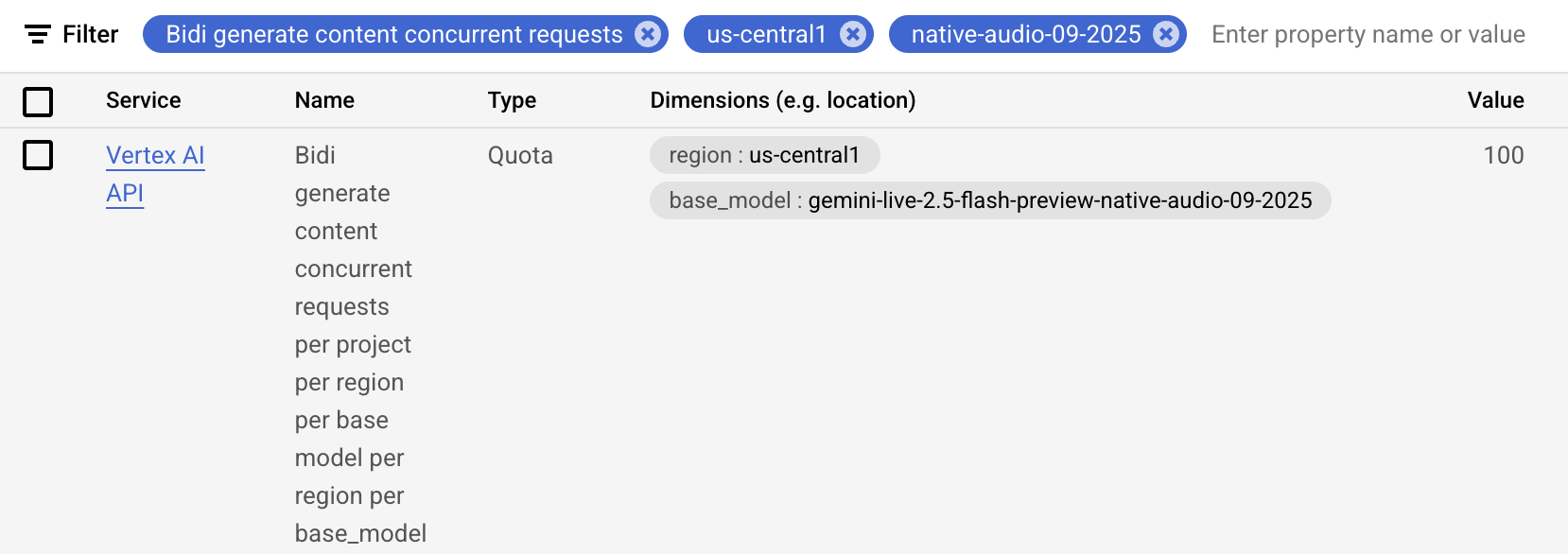
Google Cloud Console Quotas page에서
"Bidi generate content concurrent requests" 항목으로 필터링해
프로젝트/리전/모델별 값을 확인하고 증가 요청할 수 있습니다.
roles/servicemanagement.quotaAdmin 권한이 필요합니다.
핵심 차이:
- Gemini Live API: 티어 상승 시 동시 세션이 크게 증가(50 → 1,000)
- Vertex AI Live API: 연결 생성 속도(10/min) 제약이 있으나 총 동시 세션은 최대 1,000
쿼터 관리 아키텍처 패턴
대상 사용자 동시성, 확장 요구, 대기 허용도에 따라 패턴을 선택합니다.
                Start: Designing Quota Management
                              |
                              v
                   Expected Concurrent Users?
                     /                    \
            < Quota Limit           > Quota Limit or Unpredictable
                   |                              |
                   v                              v
          Pattern 1: Direct Mapping    Pattern 2: Session Pooling
          - Simple 1:1 mapping         - Queue waiting users
          - No quota logic             - Graceful degradation
          - Fast development           - Peak handling
                   |                              |
                   v                              v
              Good for:                      Good for:
              - Prototypes                   - Production at scale
              - Small teams                  - Unpredictable load
              - Controlled users             - Public applications
| Factor | Direct Mapping | Session Pooling |
|---|---|---|
| Expected users | Always < quota | May exceed quota |
| User experience | Always instant | May wait during peaks |
| Implementation complexity | Low | Medium |
| Operational overhead | None | Monitor queue depth |
| Best for | Prototypes, internal tools | Production, public apps |
Pattern 1: Direct Mapping
- 사용자 연결 시 즉시
run_live()세션 시작 - 연결 해제 시 세션 종료
- 쿼터 관리 로직 없이 1:1 매핑
Pattern 2: Session Pooling + Queueing
- 신규 연결 시 남은 세션 슬롯 확인
- 슬롯 있으면 즉시 시작
- 쿼터 초과 시 대기열에 넣고 사용자에게 안내
- 세션 종료 시 대기열 사용자를 순차 시작
Miscellaneous Controls
run_config = RunConfig(
    # invocation당 LLM 호출 수 제한
    max_llm_calls=500,  # 기본값 500
                        # 0 또는 음수 = 무제한(주의)

    # 오디오/비디오 아티팩트 저장
    save_live_blob=True,  # 기본값 False

    # 이벤트에 사용자 메타데이터 부착
    custom_metadata={"user_tier": "premium", "session_type": "support"},

    # 조합형 함수 호출(CFC) 활성화 (실험적)
    support_cfc=True  # 기본값 False
)
max_llm_calls
이 파라미터는 invocation 컨텍스트 내 LLM 호출 총량을 제한해, 폭주 비용/무한 루프를 방지합니다.
BIDI 제한:
max_llm_calls는 run_live() + StreamingMode.BIDI에는 적용되지 않습니다.
즉, 본 가이드의 양방향 스트리밍에는 자동 비용 보호가 되지 않습니다.
BIDI에서는 다음 보호를 별도 구현하세요.
- 세션 시간 제한
- 턴 수 추적
- 토큰 사용량 기반 비용 모니터링
- 애플리케이션 레벨 circuit breaker
save_live_blob
오디오/비디오 스트림을 Session/Artifact 서비스에 저장할지 제어합니다. 디버깅/컴플라이언스/품질관리 용도로 사용합니다.
마이그레이션: save_live_audio deprecated
save_live_audio는 deprecated이며 save_live_blob로 대체되었습니다.
현재는 호환 마이그레이션이 동작하지만 추후 제거 예정이므로 코드 업데이트가 필요합니다.
현재 ADK 구현에서 실제로 저장되는 것은 오디오입니다.
- Session service: 대화 이력에 오디오 참조 저장
- Artifact service: 오디오 파일 저장
활용 사례:
- 디버깅(음성 상호작용 분석)
- 컴플라이언스(감사 추적)
- QA(대화 품질 모니터링)
- 학습 데이터 수집
- 개발/테스트 환경
저장 고려사항:
- 16kHz PCM 기준 입력 오디오 약 1.92 MB/분
- Session/Artifact 양쪽 저장
- 보존 정책 확인 필요
- 고볼륨 음성 서비스에서 저장 비용 급증 가능
모범 사례:
- 필요한 환경에서만 활성화
- 보존 정책으로 자동 삭제
- 샘플링 저장(예: 10%)
- 아티팩트 서비스 압축 기능 활용
custom_metadata
custom_metadata는 현재 invocation 중 생성되는 이벤트에
임의 key-value 메타데이터를 부착합니다.
이 값은 Event.custom_metadata에 저장되고 Session에도 영속화됩니다.
from google.adk.agents.run_config import RunConfig

run_config = RunConfig(
    custom_metadata={
        "user_tier": "premium",
        "session_type": "customer_support",
        "campaign_id": "promo_2025",
        "ab_test_variant": "variant_b"
    }
)
동작 방식:
- invocation 내 모든 Event에 메타데이터 부착
- Session 서비스(DB/Vertex/in-memory)에 저장
event.custom_metadata로 조회 가능- A2A에서는 요청 메타데이터가 자동 전파됨
활용 사례:
- 사용자 세그먼트 태깅
- 세션 유형 분류
- 캠페인/실험 추적
- 컴플라이언스 플래그 부착
- trace ID/feature flag 기록
- 분석 파이프라인 차원값 저장
async for event in runner.run_live(
    session=session,
    live_request_queue=queue,
    run_config=RunConfig(
        custom_metadata={"user_id": "user_123", "experiment": "new_ui"}
    )
):
    if event.custom_metadata:
        print(f"User: {event.custom_metadata.get('user_id')}")
        print(f"Experiment: {event.custom_metadata.get('experiment')}")
A2A 통합 시 RemoteA2AAgent는 요청 메타데이터를 자동 추출해 넣습니다.
support_cfc (Experimental)
support_cfc는 Compositional Function Calling(CFC)을 켜서,
모델이 도구를 병렬 호출하거나,
한 도구 출력을 다른 도구 입력으로 체인하거나,
중간 결과 기반 조건 실행을 하도록 합니다.
⚠️ 실험 기능: 추후 변경될 수 있습니다.
중요 동작: support_cfc=True이면 streaming_mode 설정과 무관하게
ADK는 내부적으로 항상 Live API(WebSocket)를 사용합니다.
모델 요구 사항:
- ✅ 지원:
gemini-2.x - ❌ 미지원:
gemini-1.5-x - ADK는 세션 초기화 시 모델명을 검사해 미지원이면 오류
- CFC 활성화 시 안전한 병렬 실행을 위해
BuiltInCodeExecutor자동 주입
CFC 기능:
- 병렬 실행(독립 도구 동시 호출)
- 함수 체이닝(도구 출력→다음 도구 입력)
- 조건부 실행(중간 결과 기반)
적합한 사용 사례:
- 다중 API 동시 집계
- 다단계 분석 파이프라인
- 조건 분기형 리서치 작업
- 순차 실행을 넘는 복잡 도구 오케스트레이션
양방향 스트리밍 앱 관점: CFC는 BIDI에서도 동작하지만, 실시간 오디오/비디오 중심에서는 일반 함수 호출이 더 단순하고 성능이 좋은 경우가 많습니다.
더 알아보기:
요약
이번 파트에서는 RunConfig를 통해 ADK Gemini Live API Toolkit 세션을 선언적으로 제어하는 방법을 학습했습니다.
응답 모달리티 제약, BIDI/SSE 차이,
ADK Session과 Live API session 관계,
session resumption/context window compression 기반 세션 시간 관리,
동시 세션 쿼터 대응 아키텍처,
max_llm_calls/오디오 저장을 통한 비용 제어를 다뤘습니다.
이제 기능 풍부함과 운영 제약의 균형을 잡아,
장시간 대화, 플랫폼 제한 관리, 비용 제어, 리소스 모니터링이 가능한
프로덕션급 스트리밍 애플리케이션을 설계할 수 있습니다.
← Previous: Part 3: Event Handling with run_live() | Next: Part 5: How to Use Audio, Image and Video →