Galileo によるエージェントの可観測性と評価
Galileo は、AI アプリケーション向けにエンドツーエンドのトレーシング、評価、監視を提供する AI 評価および可観測性プラットフォームです。 Galileo は ADK からの OpenTelemetry(OTel)トレースの直接取り込みをサポートしており、エージェント実行、ツール呼び出し、モデルリクエストを追跡できます。
詳細は、Galileo の Google ADK integration ドキュメントを参照してください。
前提条件
- Galileo API キー
- Galileo の Project と Log stream
- Gemini API キー
依存関係をインストールする
必要に応じて、completed example の requirements.txt を使用してください。
環境変数を設定する
環境変数を設定します。
my_agent/.env
# Gemini environment variables
GOOGLE_GENAI_USE_VERTEXAI=0
GOOGLE_API_KEY="YOUR_API_KEY"

# Galileo environment variables
GALILEO_API_KEY="YOUR_API_KEY"
GALILEO_PROJECT="YOUR_PROJECT"
GALILEO_LOG_STREAM="YOUR_LOG_STREAM"
OpenTelemetry を設定する(必須)
スパンが Galileo に送信されるようにするため、ADK コンポーネントを使用する前に OTLP exporter を設定し、グローバル tracer provider をセットする必要があります。
# my_agent/agent.py

from dotenv import load_dotenv

load_dotenv()

# OpenTelemetry imports
from opentelemetry.sdk import trace as trace_sdk

# Galileo span processor (auto-configures OTLP headers & endpoint from env vars)
from galileo import otel

# OpenInference instrumentation for ADK
from openinference.instrumentation.google_adk import GoogleADKInstrumentor

# Create tracer provider and register Galileo span processor
tracer_provider = trace_sdk.TracerProvider()
galileo_span_processor = otel.GalileoSpanProcessor()
tracer_provider.add_span_processor(galileo_span_processor)

# Instrument Google ADK with OpenInference (this captures inputs/outputs)
GoogleADKInstrumentor().instrument(tracer_provider=tracer_provider)
例: ADK エージェントをトレースする
これで、OTLP exporter と tracer provider を設定するコードの後に、単純な現在時刻エージェントのコードを追加できます。
# my_agent/agent.py

from google.adk.agents import Agent

def get_current_time(city: str) -> dict:
    """Returns the current time in a specified city."""
    return {"status": "success", "city": city, "time": "10:30 AM"}


root_agent = Agent(
    model="gemini-3-flash-preview",
    name="root_agent",
    description="Tells the current time in a specified city.",
    instruction=(
        "You are a helpful assistant that tells the current time in cities. "
        "Use the 'get_current_time' tool for this purpose."
    ),
    tools=[get_current_time],
)
次のようにエージェントを実行します。
そして質問します。
完成済みの例は Google ADK + OpenTelemetry Example Project を参照してください。
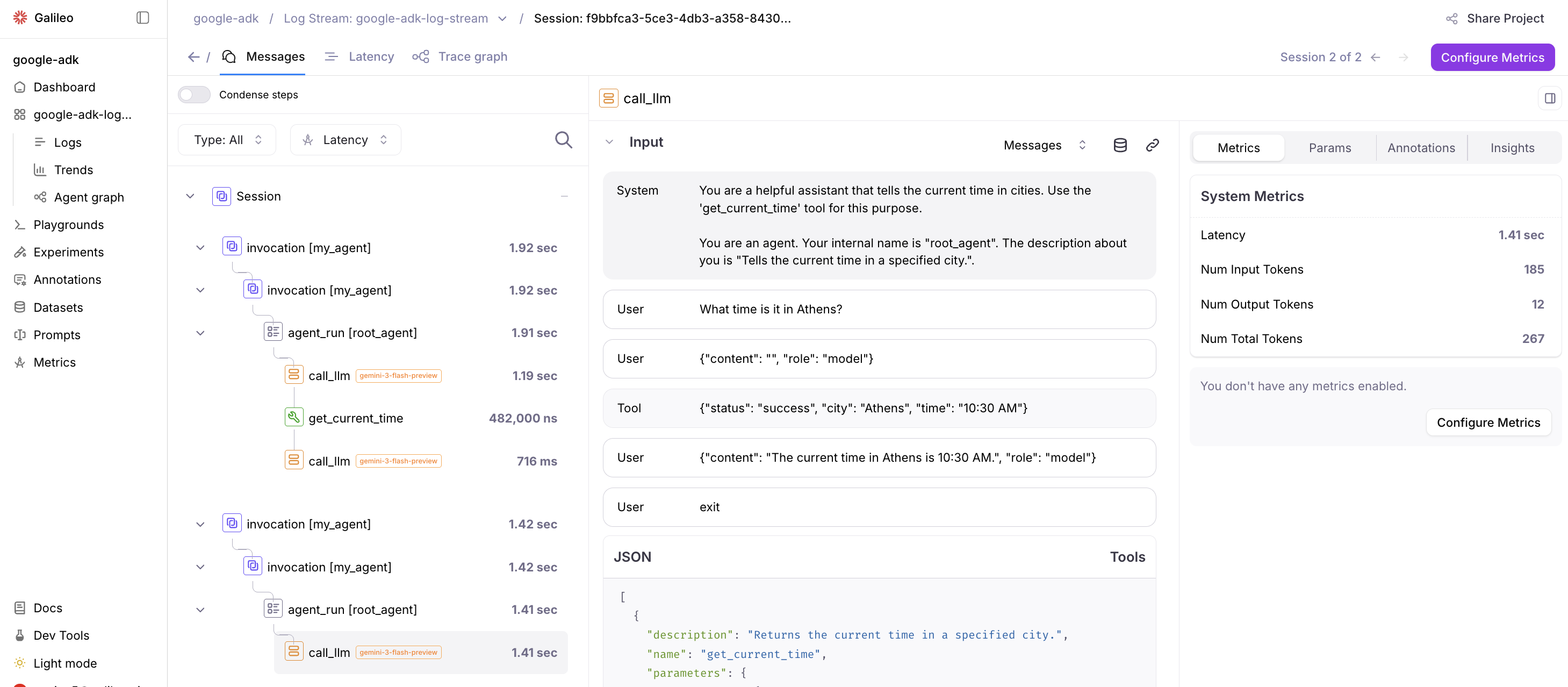
Galileo でトレースを見る
Project を選択し、Log Stream 内でトレースとスパンを確認します。
リソース
- Galileo Google ADK Integration Documentation: Google ADK プロジェクトを OpenTelemetry と OpenInference を使って Galileo と統合するための公式ドキュメントです。
- Google ADK + OpenTelemetry Example Project: Galileo を Google ADK と一緒に使う方法を示すサンプルプロジェクトです。この例は、Galileo の計測を追加した完成版の Google ADK Python Quickstart です。