Part 4: RunConfig を理解する
Part 3 では run_live() から届くイベントを処理し、モデル応答・ツール呼び出し・
ストリーミング更新を扱う方法を学びました。
このパートでは RunConfig を使って、
応答形式の制御、セッションライフサイクル管理、本番制約の適用を行う方法を説明します。
このパートで学ぶこと:
レスポンスモダリティの制約、BIDI と SSE の違い、
ADK Session と Live API Session の関係、
session resumption と context window compression による長時間運用、
同時セッションクォータ対策、max_llm_calls と音声保存によるコスト管理を扱います。
Learn More
音声/動画関連の詳細設定は Part 5: Audio, Image and Video in Live API を参照してください。
RunConfig パラメータ早見表
| Parameter | Type | Purpose | Platform Support | Reference |
|---|---|---|---|---|
| response_modalities | list[str] | 出力形式制御(TEXT/AUDIO) | Both | Details |
| streaming_mode | StreamingMode | BIDI または SSE を選択 | Both | Details |
| session_resumption | SessionResumptionConfig | 自動再接続を有効化 | Both | Details |
| context_window_compression | ContextWindowCompressionConfig | セッション長を事実上無制限化 | Both | Details |
| max_llm_calls | int | セッション内 LLM 呼び出し数上限 | Both | Details |
| save_live_blob | bool | 音声/動画ストリームを永続化 | Both | Details |
| custom_metadata | dict[str, Any] | invocation イベントにメタデータ付与 | Both | Details |
| support_cfc | bool | compositional function calling を有効化 | Gemini (2.x models only) | Details |
| speech_config | SpeechConfig | 音声/言語設定 | Both | Part 5: Voice Configuration |
| input_audio_transcription | AudioTranscriptionConfig | ユーザー音声の文字起こし | Both | Part 5: Audio Transcription |
| output_audio_transcription | AudioTranscriptionConfig | モデル音声の文字起こし | Both | Part 5: Audio Transcription |
| realtime_input_config | RealtimeInputConfig | VAD 設定 | Both | Part 5: Voice Activity Detection |
| proactivity | ProactivityConfig | proactive audio を有効化 | Gemini (native audio only) | Part 5: Proactivity and Affective Dialog |
| enable_affective_dialog | bool | 感情適応応答を有効化 | Gemini (native audio only) | Part 5: Proactivity and Affective Dialog |
Source Reference
サポート凡例:
- Both: Gemini Live API / Vertex AI Live API の両方で利用可能
- Gemini: Gemini Live API のみ
- Model-specific: 特定モデルアーキテクチャが必要
from google.genai import types
from google.adk.agents.run_config import RunConfig, StreamingMode

run_config = RunConfig(
    session_resumption=types.SessionResumptionConfig(),
    context_window_compression=types.ContextWindowCompressionConfig(...),
    speech_config=types.SpeechConfig(...),
)
Response Modalities
レスポンスモダリティはモデル出力を TEXT または AUDIO に制御します。 Gemini Live API / Vertex AI Live API ともに、1 セッションで 1 モダリティのみです。
run_config = RunConfig(
    streaming_mode=StreamingMode.BIDI
)

# 上記は実質以下と同等(未指定時は ADK が AUDIO を設定)
run_config = RunConfig(
    response_modalities=["AUDIO"],
    streaming_mode=StreamingMode.BIDI
)

# TEXT 専用
run_config = RunConfig(
    response_modalities=["TEXT"],
    streaming_mode=StreamingMode.BIDI
)

# AUDIO 専用
run_config = RunConfig(
    response_modalities=["AUDIO"],
    streaming_mode=StreamingMode.BIDI
)
# ❌ 不可: 両方同時
run_config = RunConfig(
    response_modalities=["TEXT", "AUDIO"],
    streaming_mode=StreamingMode.BIDI
)
# Error: "Only one response modality is supported per session"
重要制約:
- セッション開始時に TEXT か AUDIO を選択(途中切替不可)
- Native Audio モデルは AUDIO 必須
- モダリティは出力のみを制御。入力はモデル対応範囲でテキスト/音声/動画可
StreamingMode: BIDI または SSE
StreamingMode.BIDI: ADK は WebSocket で Live API (live.connect()) に接続StreamingMode.SSE: ADK は HTTP ストリーミングで標準 Gemini API (generate_content_async()) に接続
ここでいうモードは ADK↔Gemini API の通信方式です。 クライアント向けのアプリ構成(WebSocket/REST/SSE サーバー等)とは別概念です。
from google.adk.agents.run_config import RunConfig, StreamingMode

run_config = RunConfig(
    streaming_mode=StreamingMode.BIDI,
    response_modalities=["AUDIO"]
)

run_config = RunConfig(
    streaming_mode=StreamingMode.SSE,
    response_modalities=["TEXT"]
)
プロトコル差
BIDI は送受信同時で、割り込み・リアルタイム音声・自然なターン交代に向きます。 SSE は request → stream response の順方向パターンです。
BIDI:
sequenceDiagram
    participant App as Your Application
    participant ADK as ADK
    participant Queue as LiveRequestQueue
    participant Gemini as Gemini Live API

    Note over ADK,Gemini: Protocol: WebSocket

    App->>ADK: runner.run_live(run_config)
    ADK->>Gemini: live.connect() - WebSocket
    activate Gemini

    App->>Queue: send_content(text)
    Queue->>Gemini: → Content
    App->>Queue: send_realtime(audio)
    Queue->>Gemini: → Audio blob

    Gemini-->>ADK: ← Partial response (partial=True)
    ADK-->>App: ← Event

    App->>Queue: send_content(interrupt)
    Queue->>Gemini: → New content

    Gemini-->>ADK: ← turn_complete=True
    ADK-->>App: ← Event: turn complete

    deactivate Gemini
SSE:
sequenceDiagram
    participant App as Your Application
    participant ADK as ADK
    participant Gemini as Gemini API

    Note over ADK,Gemini: Protocol: HTTP

    App->>ADK: runner.run(run_config)
    ADK->>Gemini: generate_content_stream() - HTTP
    activate Gemini

    Gemini-->>ADK: ← Partial chunk (partial=True)
    ADK-->>App: ← Event: partial text

    Gemini-->>ADK: ← Final chunk (finish_reason=STOP)
    ADK-->>App: ← Event: complete response

    deactivate Gemini
Progressive SSE Streaming
Progressive SSE streaming は、SSE モードでの応答集約を改善する実験的機能です。有効化すると次の利点があります。
- 混在コンテンツでも元の順序を保持
- 同種テキストのみを賢くマージ
- 中間チャンクは
partial=True、最後に集約済み応答を 1 回だけ返す - 関数実行は最終イベントまで遅延させ、重複実行を防ぐ
有効化方法:
この機能は実験段階(WIP)のため、デフォルトでは無効です。環境変数で有効化します。
有効にするとよいケース:
StreamingMode.SSEでテキストと関数呼び出しが混在する応答を扱う場合- thought text と通常テキストが混ざる場合
- 応答全体の集約後に関数呼び出しを 1 回だけ実行したい場合
注意: この機能は StreamingMode.SSE のみが対象であり、このガイドの中心である StreamingMode.BIDI には適用されません。
使い分け
BIDI を使うとよいケース:
- リアルタイム音声/動画
- 受信中に追加入力を送りたい
- Live API 機能(transcription/VAD/proactivity/affective dialog)が必要
- 割り込みや自然なターン制御が重要
SSE を使うとよいケース:
- テキスト中心チャット
- シンプルな request/response
- Live API 非対応モデル(Gemini 1.5 系)
- WebSocket を使わない簡易構成
SSE で使う Gemini 1.5 系
Models:
gemini-1.5-progemini-1.5-flash
Supported:
- ✅ TEXT 入出力
- ✅ SSE ストリーミング
- ✅ 自動関数呼び出し
- ✅ 大規模コンテキスト(1.5-pro 最大 2M)
Not Supported:
- ❌ Live 音声機能(音声 I/O、転写、VAD)
- ❌
run_live()Bidi-streaming - ❌ proactivity / affective dialog
- ❌ 動画入力
Live API の Connection と Session
ADK Session と Live API Session の違い
ADK Session(SessionService 管理):
- 会話履歴・state を永続保存
- in-memory / DB / Vertex AI を選択可能
- 複数
run_live()や再起動をまたいで保持
Live API session(Live API 管理):
run_live()実行中のみ維持される論理会話コンテキストLiveRequestQueue.close()で終了- duration 制約の対象。resumption handle により再開可能
sequenceDiagram
    participant App as Your Application
    participant SS as SessionService
    participant ADK_Session as ADK Session<br/>(Persistent Storage)
    participant ADK as ADK (run_live)
    participant LiveSession as Live API Session<br/>(Ephemeral)

    App->>SS: get_session(user_id, session_id)
    SS->>ADK_Session: Load session data
    SS-->>App: Session object

    App->>ADK: runner.run_live(...)
    ADK->>LiveSession: Initialize with history
    activate LiveSession
    ADK->>ADK_Session: Update with new events

    App->>ADK: queue.close()
    ADK->>LiveSession: Terminate
    deactivate LiveSession

    Note over ADK_Session: Session persists
Connection / Session 制約
| Constraint Type | Gemini Live API (Google AI Studio) |
Vertex AI Live API (Google Cloud) |
Notes |
|---|---|---|---|
| Connection duration | ~10 minutes | Not documented separately | Gemini は接続が自動終了。ADK が再接続 |
| Session Duration (Audio-only) | 15 minutes | 10 minutes | 圧縮なし基準。圧縮有効時は無制限 |
| Session Duration (Audio + video) | 2 minutes | 10 minutes | Gemini は動画で短い。圧縮有効時は無制限 |
| Concurrent sessions | 50 (Tier 1) 1,000 (Tier 2+) |
Up to 1,000 | Gemini は tier 依存、Vertex は project 依存 |
Live API Session Resumption
デフォルトでは接続は約 10 分で閉じます。 Session Resumption を有効化すると、resumption handle を使って 同じセッション文脈を新しい接続へ引き継げます。
ADK ではこれを自動化できます。
RunConfig(session_resumption=...) を設定すると、
接続終了検知・handle キャッシュ・再接続を内部で処理します。
from google.genai import types

run_config = RunConfig(
    session_resumption=types.SessionResumptionConfig()
)
ADK が面倒を見る範囲
ADK は ADK↔Live API 間の WebSocket を管理します。 クライアント↔あなたのアプリ間接続の再接続や障害処理は アプリ側で管理する必要があります。
自動再接続フロー
- 初回 WebSocket 接続
session_resumption_updateから最新 handle をキャッシュ- 接続制限到達で graceful close
- ADK が cached handle で再接続
- 同一セッションでストリーミング継続
Live API Context Window Compression
課題: 長時間会話では時間制限とトークン制限に達します。
解決: context window compression で古い会話を要約し、 最近の会話を保持しつつセッションを継続します。 有効化すると実運用上のセッション継続時間を伸ばせます。
from google.genai import types
from google.adk.agents.run_config import RunConfig

run_config = RunConfig(
    context_window_compression=types.ContextWindowCompressionConfig(
        trigger_tokens=100000,
        sliding_window=types.SlidingWindow(
            target_tokens=80000
        )
    )
)
推奨目安:
trigger_tokens: コンテキスト上限の 70〜80%target_tokens: 60〜70%
Live API 接続/セッション運用のベストプラクティス
必須: session resumption
- ✅ 本番では原則有効化
- ✅ 接続タイムアウトを透過処理
- ✅ セッション継続性を維持
推奨: 長時間会話なら compression
- ✅ 15分(音声)/2分(音声+動画)を超える可能性がある場合に有効
- ⚠️ 要約時に遅延や文脈ニュアンス損失が起こり得る
補助: duration 監視(compression 無効時)
- ✅ Gemini: 15分/2分、Vertex: 10分 を監視
- ✅ 上限の 1〜2 分前にユーザー通知
Concurrent Live API Sessions and Quota Management
複数同時ユーザーでは、同時セッション上限がボトルネックになります。 アプリ側でセッション運用戦略を設計してください。
クォータの理解
Gemini Live API(tier ベース):
| Tier | Concurrent Sessions | TPM (Tokens Per Minute) | Access |
|---|---|---|---|
| Free Tier | Limited* | 1,000,000 | Free API key |
| Tier 1 | 50 | 4,000,000 | Pay-as-you-go |
| Tier 2 | 1,000 | 10,000,000 | Higher usage tier |
| Tier 3 | 1,000 | 10,000,000 | Higher usage tier |
Vertex AI Live API(project ベース):
| Resource Type | Limit | Scope |
|---|---|---|
| Concurrent live bidirectional connections | 10 per minute | Per project, per region |
| Maximum concurrent sessions | Up to 1,000 | Per project |
| Session creation/deletion/update | 100 per minute | Per project, per region |
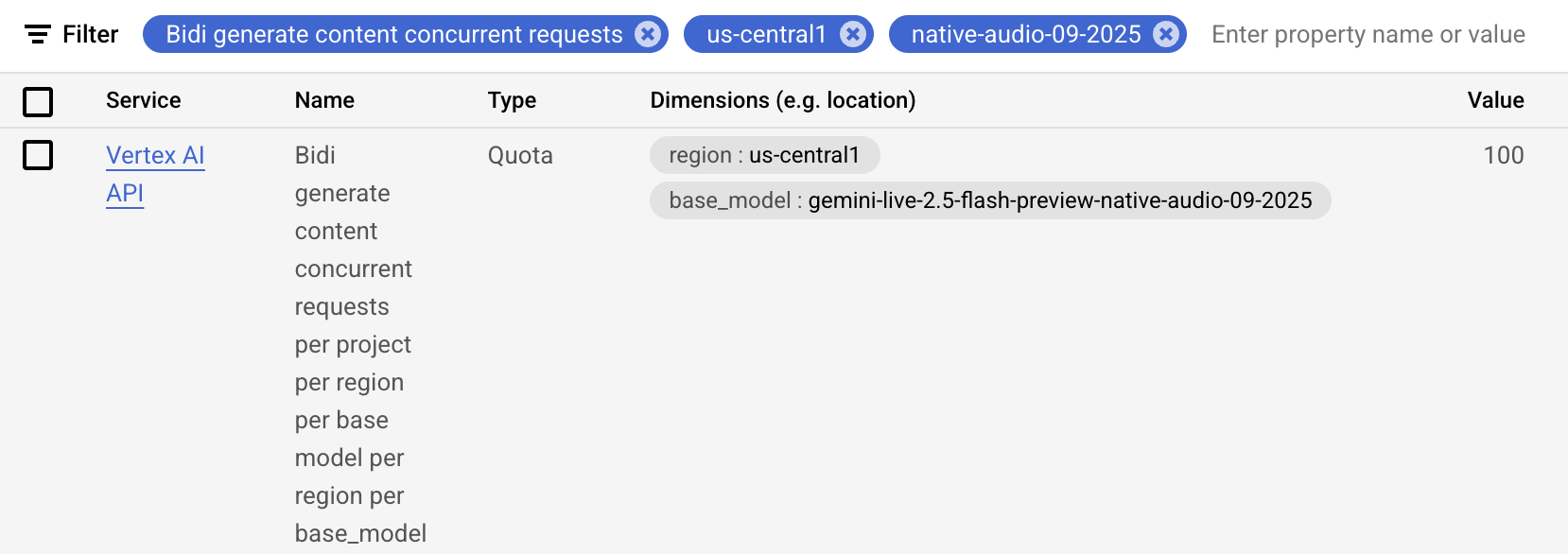
推奨アーキテクチャ
Pattern 1: Direct Mapping
- 接続ユーザーごとに即
run_live()セッション作成 - 小規模・制御可能な負荷向け
Pattern 2: Session Pooling + Queueing
- 空きスロット時のみ開始
- 上限超過時は待機キューへ
- セッション終了時に次ユーザーを昇格
ADK Session と Live API Session
ADK の Session は永続状態、Live API session はストリーミング接続中の論理会話です。
Live API 接続とセッション
接続方式と会話状態の寿命は別概念として扱います。
プラットフォーム別の接続/セッション制限
各プラットフォームで同時接続数やセッション上限が異なります。
ADK の再接続管理の範囲
ADK はセッション再開を補助しますが、アプリケーション側の状態設計も必要です。
ADK がセッション再開をどう管理するか
再接続時に同じ session_id を使い、会話継続を透過的に扱います。
自動再接続シーケンス図
再接続の流れは、クライアント・ADK・Live API の 3 層で整理すると分かりやすくなります。
Platform Behavior and Official Limits
公式の制限値に合わせて、quota と duration を監視してください。
When NOT to Use Context Window Compression
短時間セッションや小さなコンテキストでは、圧縮を入れない方がシンプルです。
Live API 接続・セッション管理のベストプラクティス
必須: session resumption を有効化する
長時間会話では再接続を前提に設計します。
推奨: 長時間会話には context window compression
会話が長くなるならコンテキスト圧縮で継続性を確保します。
補助: セッション時間を監視する
制限に近づいたら UI で通知するのが安全です。
同時 Live API セッションクォータの理解
アプリの接続数とモデル側の制限を両方見ます。
クォータ管理のアーキテクチャ
Pattern 1: Direct Mapping (Simple Applications)
接続数が少ない小規模アプリ向けです。
Pattern 2: Session Pooling with Queueing
セッションプールで待機列を管理し、上限を越えないようにします。
この invocation の全イベントにメタデータを付与する
custom_metadata はイベントの追跡や分析に使えます。
A2A request metadata は custom_metadata に自動マッピングされる
A2A 互換のリクエスト情報は RunConfig の metadata に反映されます。
Miscellaneous Controls
run_config = RunConfig(
    max_llm_calls=500,
    save_live_blob=True,
    custom_metadata={"user_tier": "premium", "session_type": "support"},
    support_cfc=True
)
max_llm_calls
max_llm_calls は invocation ごとの LLM 呼び出し上限です。
ただし BIDI run_live() には適用されません。
BIDI では duration 制限や token usage 監視などを別途実装してください。
save_live_blob
音声/動画の永続化制御です。 現状 ADK 実装で実際に保存されるのは主に音声です。
Migration Note
save_live_audio は非推奨で、save_live_blob へ移行してください。
custom_metadata
任意の key-value を Event.custom_metadata に付与し、
セッションへ保存できます。
run_config = RunConfig(
    custom_metadata={
        "user_tier": "premium",
        "session_type": "customer_support",
        "campaign_id": "promo_2025",
        "ab_test_variant": "variant_b"
    }
)
support_cfc (Experimental)
support_cfc=True では、設定上 SSE を選んでも内部的に Live API(WebSocket) を使用します。
gemini-2.x 系が必要で、gemini-1.5-x は非対応です。
追加の制御ポイント
| 項目 | 説明 |
|---|---|
max_llm_calls |
1 invocation 内の LLM 呼び出し上限 |
save_live_blob |
音声/動画の永続化設定 |
custom_metadata |
追加メタデータ |
support_cfc |
compositional function calling |
運用上のチェックリスト
response_modalitiesは 1 セッション 1 種類にする- 長時間会話では session resumption を有効化する
- 高負荷環境では context window compression を検討する
- クォータ監視はアプリ側でも行う
Example: metadata と blob 保存を併用する
run_config = RunConfig(
    max_llm_calls=500,
    save_live_blob=True,
    custom_metadata={"user_tier": "premium", "session_type": "support"},
    support_cfc=True,
)
Example: TEXT / AUDIO 切り替えの意図
- TEXT はチャット中心の UI に向く
- AUDIO は音声対話に向く
- 両方の同時指定は不可
まとめ
このパートでは、RunConfig によって ADK Gemini Live API Toolkit セッションを 宣言的に制御する方法を学びました。 レスポンスモダリティ、BIDI/SSE 差、Session 関係、 session resumption/context compression、 同時セッションクォータ対策、コスト/保存設定を理解し、 本番運用に耐えるストリーミング設計が可能になります。
← Previous: Part 3: Event Handling with run_live() | Next: Part 5: How to Use Audio, Image and Video →