ツールによる認証
多くのツールは、保護されたリソース(Googleカレンダーのユーザーデータ、Salesforceのレコードなど)にアクセスする必要があり、認証が必要です。ADKは、さまざまな認証方法を安全に処理するためのシステムを提供します。
関連する主要なコンポーネントは次のとおりです。
AuthScheme: APIが認証資格情報をどのように期待するかを定義します(例:ヘッダーのAPIキー、OAuth 2.0ベアラートークン)。ADKは、OpenAPI 3.0と同じタイプの認証スキームをサポートしています。各タイプの資格情報の詳細については、OpenAPIドキュメント:認証を参照してください。ADKは、APIKey、HTTPBearer、OAuth2、OpenIdConnectWithConfigなどの特定のクラスを使用します。AuthCredential: 認証プロセスを開始するために必要な初期情報を保持します(例:アプリケーションのOAuthクライアントID/シークレット、APIキーの値)。資格情報のタイプを指定するauth_type(API_KEY、OAUTH2、SERVICE_ACCOUNTなど)が含まれます。
一般的なフローでは、ツールを構成するときにこれらの詳細を提供します。その後、ADKは、ツールがAPIを呼び出す前に、初期資格情報を利用可能な資格情報(アクセストークンなど)に自動的に交換しようとします。ユーザーの操作が必要なフロー(OAuth同意など)の場合、エージェントクライアントアプリケーションを含む特定の対話型プロセスがトリガーされます。
サポートされている初期資格情報タイプ
- API_KEY: 単純なキー/値認証用。通常、交換は必要ありません。
- HTTP: 基本認証(交換は推奨/サポートされていません)またはすでに取得済みのベアラートークンを表すことができます。ベアラートークンの場合、交換は必要ありません。
- OAUTH2: 標準のOAuth 2.0フロー用。構成(クライアントID、シークレット、スコープ)が必要であり、多くの場合、ユーザーの同意を得るための対話型フローをトリガーします。
- OPEN_ID_CONNECT: OpenID Connectベースの認証用。OAuth2と同様に、多くの場合、構成とユーザーの操作が必要です。
- SERVICE_ACCOUNT: Google Cloudサービスアカウントの資格情報(JSONキーまたはアプリケーションのデフォルト資格情報)用。通常、ベアラートークンと交換されます。
ツールでの認証の構成
ツールを定義するときに認証を設定します。
-
RestApiTool / OpenAPIToolset: 初期化中に
auth_schemeとauth_credentialを渡します -
GoogleApiToolSetツール: ADKには、Googleカレンダー、BigQueryなどの組み込みのファーストパーティツールがあります。ツールセットの特定のメソッドを使用します。
-
APIHubToolset / ApplicationIntegrationToolset: APIハブで管理されているAPI / アプリケーション統合によって提供されるAPIが認証を必要とする場合は、初期化中に
auth_schemeとauth_credentialを渡します。
警告
アクセストークンや特にリフレッシュトークンなどの機密性の高い資格情報をセッション状態に直接保存すると、セッションストレージバックエンド(SessionService)とアプリケーション全体のセキュリティ体制によっては、セキュリティリスクが生じる可能性があります。
InMemorySessionService: テストや開発には適していますが、プロセスが終了するとデータは失われます。一時的なものであるため、リスクは低くなります。- データベース/永続ストレージ: 堅牢な暗号化ライブラリ(
cryptographyなど)を使用してデータベースに保存する前にトークンデータを暗号化し、暗号化キーを安全に管理する(キー管理サービスを使用するなど)ことを強く検討してください。 - 安全なシークレットストア: 本番環境では、専用のシークレットマネージャー(Google Cloud Secret ManagerやHashiCorp Vaultなど)に機密性の高い資格情報を保存することが最も推奨されるアプローチです。ツールは、セッション状態に短期間のアクセストークンまたは安全な参照(リフレッシュトークン自体ではない)のみを保存し、必要に応じて安全なストアから必要なシークレットを取得する可能性があります。
ジャーニー1:認証済みツールを使用したエージェントアプリケーションの構築
このセクションでは、エージェントアプリケーション内で認証が必要な既存のツール(RestApiTool/ OpenAPIToolset、APIHubToolset、GoogleApiToolSetのツールなど)を使用することに焦点を当てます。主な責任は、ツールを構成し、対話型認証フローのクライアント側部分(ツールで必要な場合)を処理することです。
1. 認証によるツールの構成
認証済みツールをエージェントに追加する場合は、必要なAuthSchemeとアプリケーションの初期AuthCredentialを提供する必要があります。
A. OpenAPIベースのツールセットの使用(OpenAPIToolset、APIHubToolsetなど)
ツールセットの初期化中にスキームと資格情報を渡します。ツールセットは、生成されたすべてのツールにそれらを適用します。ADKで認証付きのツールを作成する方法はいくつかあります。
APIキーが必要なツールを作成します。
from google.adk.tools.openapi_tool.auth.auth_helpers import token_to_scheme_credential
from google.adk.tools.openapi_tool.openapi_spec_parser.openapi_toolset import OpenAPIToolset

auth_scheme, auth_credential = token_to_scheme_credential(
    "apikey", "query", "apikey", "YOUR_API_KEY_STRING"
)
sample_api_toolset = OpenAPIToolset(
    spec_str="...",  # OpenAPI仕様文字列でこれを埋めます
    spec_str_type="yaml",
    auth_scheme=auth_scheme,
    auth_credential=auth_credential,
)
OAuth2が必要なツールを作成します。
from google.adk.tools.openapi_tool.openapi_spec_parser.openapi_toolset import OpenAPIToolset
from fastapi.openapi.models import OAuth2
from fastapi.openapi.models import OAuthFlowAuthorizationCode
from fastapi.openapi.models import OAuthFlows
from google.adk.auth import AuthCredential
from google.adk.auth import AuthCredentialTypes
from google.adk.auth import OAuth2Auth

auth_scheme = OAuth2(
    flows=OAuthFlows(
        authorizationCode=OAuthFlowAuthorizationCode(
            authorizationUrl="https://accounts.google.com/o/oauth2/auth",
            tokenUrl="https://oauth2.googleapis.com/token",
            scopes={
                "https://www.googleapis.com/auth/calendar": "カレンダースコープ"
            },
        )
    )
)
auth_credential = AuthCredential(
    auth_type=AuthCredentialTypes.OAUTH2,
    oauth2=OAuth2Auth(
        client_id=YOUR_OAUTH_CLIENT_ID,
        client_secret=YOUR_OAUTH_CLIENT_SECRET
    ),
)

calendar_api_toolset = OpenAPIToolset(
    spec_str=google_calendar_openapi_spec_str, # openapi仕様でこれを埋めます
    spec_str_type='yaml',
    auth_scheme=auth_scheme,
    auth_credential=auth_credential,
)
サービスアカウントが必要なツールを作成します。
from google.adk.tools.openapi_tool.auth.auth_helpers import service_account_dict_to_scheme_credential
from google.adk.tools.openapi_tool.openapi_spec_parser.openapi_toolset import OpenAPIToolset

service_account_cred = json.loads(service_account_json_str)
auth_scheme, auth_credential = service_account_dict_to_scheme_credential(
    config=service_account_cred,
    scopes=["https://www.googleapis.com/auth/cloud-platform"],
)
sample_toolset = OpenAPIToolset(
    spec_str=sa_openapi_spec_str, # openapi仕様でこれを埋めます
    spec_str_type='json',
    auth_scheme=auth_scheme,
    auth_credential=auth_credential,
)
OpenID connectが必要なツールを作成します。
from google.adk.auth.auth_schemes import OpenIdConnectWithConfig
from google.adk.auth.auth_credential import AuthCredential, AuthCredentialTypes, OAuth2Auth
from google.adk.tools.openapi_tool.openapi_spec_parser.openapi_toolset import OpenAPIToolset

auth_scheme = OpenIdConnectWithConfig(
    authorization_endpoint=OAUTH2_AUTH_ENDPOINT_URL,
    token_endpoint=OAUTH2_TOKEN_ENDPOINT_URL,
    scopes=['openid', 'YOUR_OAUTH_SCOPES"]
)
auth_credential = AuthCredential(
    auth_type=AuthCredentialTypes.OPEN_ID_CONNECT,
    oauth2=OAuth2Auth(
        client_id="...",
        client_secret="...",
    )
)

userinfo_toolset = OpenAPIToolset(
    spec_str=content, # 実際の仕様で埋めます
    spec_str_type='yaml',
    auth_scheme=auth_scheme,
    auth_credential=auth_credential,
)
B. Google APIツールセットの使用(例:calendar_tool_set)
これらのツールセットには、多くの場合、専用の構成メソッドがあります。
ヒント:Google OAuthクライアントIDとシークレットを作成する方法については、次のガイドを参照してください:Google APIクライアントIDの取得
# 例:Googleカレンダーツールの構成
from google.adk.tools.google_api_tool import calendar_tool_set

client_id = "YOUR_GOOGLE_OAUTH_CLIENT_ID.apps.googleusercontent.com"
client_secret = "YOUR_GOOGLE_OAUTH_CLIENT_SECRET"

# このツールセットタイプの特定の構成メソッドを使用します
calendar_tool_set.configure_auth(
    client_id=oauth_client_id, client_secret=oauth_client_secret
)

# agent = LlmAgent(..., tools=calendar_tool_set.get_tool('calendar_tool_set'))
認証要求フロー(ツールが認証資格情報を要求する場合)のシーケンス図は次のようになります。
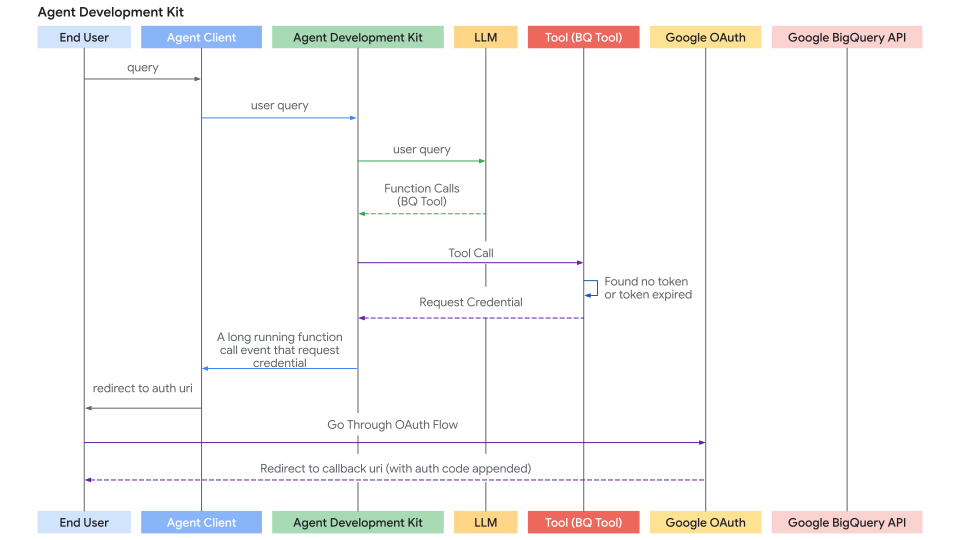
2. 対話型OAuth/OIDCフローの処理(クライアント側)
ツールがユーザーのログイン/同意(通常はOAuth 2.0またはOIDC)を必要とする場合、ADKフレームワークは実行を一時停止し、エージェントクライアントアプリケーションに通知します。2つのケースがあります。
- エージェントクライアントアプリケーションは、同じプロセスで
runner.run_asyncを介してエージェントを直接実行します。例:UIバックエンド、CLIアプリ、Sparkジョブなど。 - エージェントクライアントアプリケーションは、
/runまたは/run_sseエンドポイントを介してADKのfastapiサーバーと対話します。ADKのfastapiサーバーは、エージェントクライアントアプリケーションと同じサーバーまたは異なるサーバーに設定できます。
2番目のケースは、/runまたは/run_sseエンドポイントもrunner.run_asyncを呼び出すため、最初のケースの特殊なケースです。唯一の違いは次のとおりです。
- エージェントを実行するためにPython関数を呼び出すか(最初のケース)、エージェントを実行するためにサービスエンドポイントを呼び出すか(2番目のケース)。
- 結果イベントがメモリ内オブジェクト(最初のケース)であるか、http応答のシリアル化されたjson文字列(2番目のケース)であるか。
以下のセクションでは、最初のケースに焦点を当て、2番目のケースに非常に簡単にマッピングできるはずです。必要に応じて、2番目のケースを処理するためのいくつかの違いについても説明します。
クライアントアプリケーションのステップバイステップのプロセスは次のとおりです。
ステップ1:エージェントの実行と認証要求の検出
runner.run_asyncを使用してエージェントの対話を開始します。- 生成されたイベントを反復処理します。
- 関数呼び出しに
adk_request_credentialという特別な名前を持つ特定の関数呼び出しイベントを探します。このイベントは、ユーザーの操作が必要であることを示します。ヘルパー関数を使用して、このイベントを識別し、必要な情報を抽出できます。(2番目のケースでは、ロジックは似ています。http応答からイベントを逆シリアル化します。)
# runner = Runner(...)
# session = await session_service.create_session(...)
# content = types.Content(...) # ユーザーの最初のクエリ

print("\nエージェントを実行しています...")
events_async = runner.run_async(
    session_id=session.id, user_id='user', new_message=content
)

auth_request_function_call_id, auth_config = None, None

async for event in events_async:
    # ヘルパーを使用して特定の認証要求イベントを確認します
    if (auth_request_function_call := get_auth_request_function_call(event)):
        print("--> エージェントによる認証が必要です。")
        # 後で応答するために必要なIDを保存します
        if not (auth_request_function_call_id := auth_request_function_call.id):
            raise ValueError(f'関数呼び出しから関数呼び出しIDを取得できません:{auth_request_function_call}')
        # auth_uriなどを含むAuthConfigを取得します
        auth_config = get_auth_config(auth_request_function_call)
        break # 今はイベントの処理を停止し、ユーザーの操作が必要です

if not auth_request_function_call_id:
    print("\n認証は不要か、エージェントが終了しました。")
    # return # または受信した場合は最終応答を処理します
ヘルパー関数helpers.py:
from google.adk.events import Event
from google.adk.auth import AuthConfig # 必要な型をインポート
from google.genai import types

def get_auth_request_function_call(event: Event) -> types.FunctionCall:
    # イベントから特別な認証要求関数呼び出しを取得します
    if not event.content or not event.content.parts:
        return None
    for part in event.content.parts:
        if (
            part
            and part.function_call
            and part.function_call.name == 'adk_request_credential'
            and event.long_running_tool_ids
            and part.function_call.id in event.long_running_tool_ids
        ):

            return part.function_call

def get_auth_config(auth_request_function_call: types.FunctionCall) -> AuthConfig:
    # 認証要求関数呼び出しの引数からAuthConfigオブジェクトを抽出します
    if not auth_request_function_call.args or not (auth_config := auth_request_function_call.args.get('authConfig')):
        raise ValueError(f'関数呼び出しから認証構成を取得できません:{auth_request_function_call}')
    if isinstance(auth_config, dict):
        auth_config = AuthConfig.model_validate(auth_config)
    elif not isinstance(auth_config, AuthConfig):
        raise ValueError(f'認証構成{auth_config}はAuthConfigのインスタンスではありません。')
    return auth_config
ステップ2:承認のためにユーザーをリダイレクトする
- 前のステップで抽出した
auth_configから承認URL(auth_uri)を取得します。 - 重要なことに、アプリケーションの
redirect_uriをこのauth_uriにクエリパラメータとして追加します。このredirect_uriは、OAuthプロバイダー(例:Google Cloud Console、Okta管理コンソール)に事前に登録されている必要があります。 - ユーザーをこの完全なURLに誘導します(例:ブラウザで開きます)。
# (認証が必要と検出された後も続行)

if auth_request_function_call_id and auth_config:
    # AuthConfigからベース承認URLを取得します
    base_auth_uri = auth_config.exchanged_auth_credential.oauth2.auth_uri

    if base_auth_uri:
        redirect_uri = 'http://localhost:8000/callback' # OAuthクライアントアプリの構成と一致する必要があります
        # redirect_uriを追加します(本番環境ではurlencodeを使用します)
        auth_request_uri = base_auth_uri + f'&redirect_uri={redirect_uri}'
        # これで、エンドユーザーをこのauth_request_uriにリダイレクトするか、ブラウザでこのauth_request_uriを開くように依頼する必要があります
        # このauth_request_uriは、対応する認証プロバイダーによって提供され、エンドユーザーはログインしてアプリケーションがデータにアクセスすることを承認する必要があります
        # その後、認証プロバイダーはエンドユーザーを提供したredirect_uriにリダイレクトします
        # 次のステップ:ユーザー(またはWebサーバーハンドラー)からこのコールバックURLを取得します
    else:
         print("エラー:auth_configで認証URIが見つかりません。")
         # エラーを処理します
ステップ3. リダイレクトコールバックの処理(クライアント):
- アプリケーションには、ユーザーがプロバイダーでアプリケーションを承認した後にユーザーを受信するためのメカニズム(
redirect_uriのWebサーバールートなど)が必要です。 - プロバイダーはユーザーを
redirect_uriにリダイレクトし、authorization_code(および場合によってはstate、scope)をURLにクエリパラメーターとして追加します。 - この受信リクエストから完全なコールバックURLをキャプチャします。
- (このステップは、メインのエージェント実行ループの外、Webサーバーまたは同等のコールバックハンドラーで発生します。)
ステップ4. 認証結果をADKに送り返す(クライアント):
- 完全なコールバックURL(認証コードを含む)を取得したら、クライアントステップ1で保存した
auth_request_function_call_idとauth_configオブジェクトを取得します。 - キャプチャしたコールバックURLを
exchanged_auth_credential.oauth2.auth_response_uriフィールドに設定します。また、exchanged_auth_credential.oauth2.redirect_uriに使用したリダイレクトURIが含まれていることを確認します。 types.FunctionResponseを含むtypes.Partを含むtypes.Contentオブジェクトを作成します。nameを"adk_request_credential"に設定します。(注:これはADKが認証を続行するための特別な名前です。他の名前は使用しないでください。)idを保存したauth_request_function_call_idに設定します。responseをシリアル化された(例:.model_dump())更新されたAuthConfigオブジェクトに設定します。
- この
FunctionResponseコンテンツをnew_messageとして渡して、同じセッションに対してrunner.run_asyncを再度呼び出します。
# (ユーザー操作後も続行)

    # コールバックURLの取得をシミュレートします(例:ユーザーの貼り付けまたはWebハンドラーから)
    auth_response_uri = await get_user_input(
        f'完全なコールバックURLをここに貼り付けてください:\n> '
    )
    auth_response_uri = auth_response_uri.strip() # 入力をクリーンアップします

    if not auth_response_uri:
        print("コールバックURLが提供されていません。中止します。")
        return

    # 受信したAuthConfigをコールバックの詳細で更新します
    auth_config.exchanged_auth_credential.oauth2.auth_response_uri = auth_response_uri
    # トークン交換で必要になる可能性があるため、使用したredirect_uriも含めます
    auth_config.exchanged_auth_credential.oauth2.redirect_uri = redirect_uri

    # FunctionResponse Contentオブジェクトを構築します
    auth_content = types.Content(
        role='user', # FunctionResponseを送信する場合、ロールは「user」にすることができます
        parts=[
            types.Part(
                function_response=types.FunctionResponse(
                    id=auth_request_function_call_id,       # 元のリクエストへのリンク
                    name='adk_request_credential', # 特別なフレームワーク関数名
                    response=auth_config.model_dump() # *更新された* AuthConfigを返信します
                )
            )
        ],
    )

    # --- 実行を再開 ---
    print("\n認証の詳細をエージェントに再送信しています...")
    events_async_after_auth = runner.run_async(
        session_id=session.id,
        user_id='user',
        new_message=auth_content, # FunctionResponseを返信します
    )

    # --- 最終的なエージェントの出力を処理 ---
    print("\n--- 認証後のエージェントの応答 ---")
    async for event in events_async_after_auth:
        # 通常どおりイベントを処理し、ツール呼び出しが成功することを期待します
        print(event) # 検査のために完全なイベントを出力します
注:再開機能付きの認証応答
ADKエージェントワークフローが
再開機能で構成されている場合は、認証
応答とともに呼び出しID(invocation_id)パラメーターも指定する必要があります。
指定する呼び出しIDは、認証要求を生成した呼び出しと同じでなければなりません。
そうしないと、システムは認証応答で新しい呼び出しを開始します。
エージェントが再開機能を使用する場合は、認証応答に含めることができるように、
認証要求とともに呼び出しIDをパラメーターとして含めることを検討してください。
再開機能の使用方法の詳細については、
停止したエージェントの再開を参照してください。
ステップ5:ADKがトークン交換とツール再試行を処理し、ツール結果を取得する
- ADKは
adk_request_credentialのFunctionResponseを受信します。 - 更新された
AuthConfigの情報(コードを含むコールバックURLを含む)を使用して、プロバイダーのトークンエンドポイントとOAuth トークン交換を実行し、アクセストークン(および場合によってはリフレッシュトークン)を取得します。 - ADKは、セッション状態に設定することで、これらのトークンを内部的に利用可能にします。
- ADKは、元のツール呼び出し(最初に認証の欠落により失敗した呼び出し)を自動的に再試行します。
- 今回、ツールは有効なトークン(
tool_context.get_auth_response()を介して)を見つけ、認証されたAPI呼び出しを正常に実行します。 - エージェントはツールから実際の結果を受信し、ユーザーへの最終的な応答を生成します。
認証応答フロー(エージェントクライアントが認証応答を返信し、ADKがツール呼び出しを再試行する場合)のシーケンス図は次のようになります。
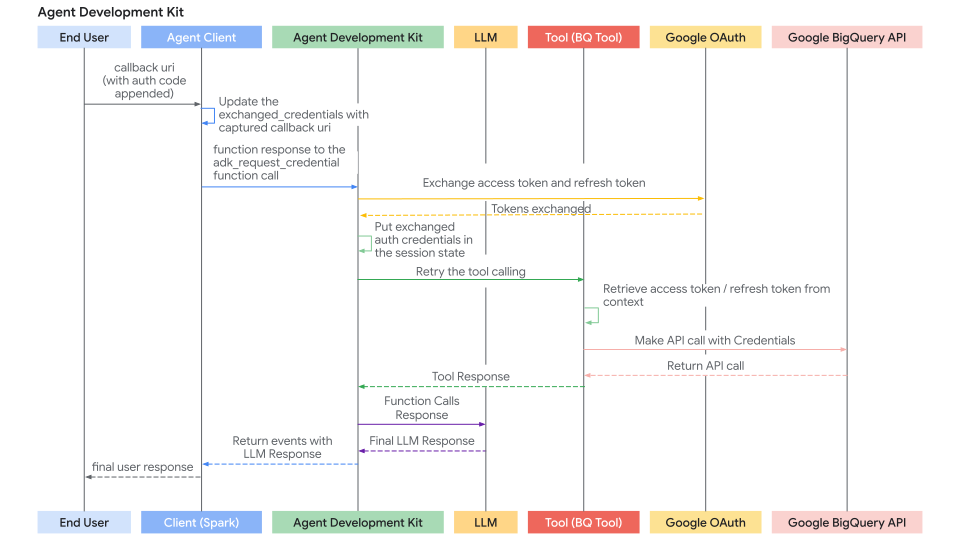
ジャーニー2:認証が必要なカスタムツール(FunctionTool)の構築
このセクションでは、新しいADKツールを作成する際に、カスタムPython関数内で認証ロジックを実装することに焦点を当てます。例としてFunctionToolを実装します。
前提条件
関数シグネチャにはtool_context: ToolContextが必須です。ADKはこのオブジェクトを自動的に挿入し、状態および認証メカニズムへのアクセスを提供します。
from google.adk.tools import FunctionTool, ToolContext
from typing import Dict

def my_authenticated_tool_function(param1: str, ..., tool_context: ToolContext) -> dict:
    # ... ロジック ...
    pass

my_tool = FunctionTool(func=my_authenticated_tool_function)
ツール関数内の認証ロジック
関数内で次の手順を実装します。
ステップ1:キャッシュされた有効な資格情報を確認する
ツール関数内で、まずこのセッションの以前の実行から有効な資格情報(アクセストークン/リフレッシュトークンなど)がすでに保存されているかどうかを確認します。現在のセッションの資格情報はtool_context.invocation_context.session.state(状態の辞書)に保存する必要があります。tool_context.invocation_context.session.state.get(credential_name, None)をチェックして、既存の資格情報の存在を確認します。
from google.oauth2.credentials import Credentials
from google.auth.transport.requests import Request

# ツール関数内
TOKEN_CACHE_KEY = "my_tool_tokens" # 一意のキーを選択
SCOPES = ["scope1", "scope2"] # 必要なスコープを定義

creds = None
cached_token_info = tool_context.state.get(TOKEN_CACHE_KEY)
if cached_token_info:
    try:
        creds = Credentials.from_authorized_user_info(cached_token_info, SCOPES)
        if not creds.valid and creds.expired and creds.refresh_token:
            creds.refresh(Request())
            tool_context.state[TOKEN_CACHE_KEY] = json.loads(creds.to_json()) # キャッシュを更新
        elif not creds.valid:
            creds = None # 無効、再認証が必要
            tool_context.state[TOKEN_CACHE_KEY] = None
    except Exception as e:
        print(f"キャッシュされた資格情報の読み込み/更新エラー:{e}")
        creds = None
        tool_context.state[TOKEN_CACHE_KEY] = None

if creds and creds.valid:
    # ステップ5にスキップ:認証済みAPI呼び出しを行う
    pass
else:
    # ステップ2に進む...
    pass
ステップ2:クライアントからの認証応答を確認する
- ステップ1で有効な資格情報が得られなかった場合は、クライアントが
exchanged_credential = tool_context.get_auth_response()を呼び出して対話型フローを完了したかどうかを確認します。 - これにより、クライアントから返された更新済みの
exchanged_credentialオブジェクト(auth_response_uriにコールバックURLが含まれています)が返されます。
# ツールで構成されたauth_schemeとauth_credentialを使用します。
# exchanged_credential: AuthCredential | None

exchanged_credential = tool_context.get_auth_response(AuthConfig(
  auth_scheme=auth_scheme,
  raw_auth_credential=auth_credential,
))
# exchanged_credentialがNoneでない場合、認証応答からすでに交換された資格情報があります。
if exchanged_credential:
   # ADKはすでにアクセストークンを交換しています
        access_token = exchanged_credential.oauth2.access_token
        refresh_token = exchanged_credential.oauth2.refresh_token
        creds = Credentials(
            token=access_token,
            refresh_token=refresh_token,
            token_uri=auth_scheme.flows.authorizationCode.tokenUrl,
            client_id=auth_credential.oauth2.client_id,
            client_secret=auth_credential.oauth2.client_secret,
            scopes=list(auth_scheme.flows.authorizationCode.scopes.keys()),
        )
    # セッション状態にトークンをキャッシュし、APIを呼び出してステップ5にスキップします
ステップ3:認証要求を開始する
有効な資格情報(ステップ1)と認証応答(ステップ2)が見つからない場合、ツールはOAuthフローを開始する必要があります。AuthSchemeと初期AuthCredentialを定義し、tool_context.request_credential()を呼び出します。認証が必要であることを示す応答を返します。
# ツールで構成されたauth_schemeとauth_credentialを使用します。

  tool_context.request_credential(AuthConfig(
    auth_scheme=auth_scheme,
    raw_auth_credential=auth_credential,
  ))
  return {'pending': true, 'message': 'ユーザー認証を待っています。'}

# request_credentialを設定すると、ADKは保留中の認証イベントを検出します。実行を一時停止し、エンドユーザーにログインを求めます。
ステップ4:認証コードをトークンに交換する
ADKは自動的にoauth認証URLを生成し、エージェントクライアントアプリケーションに提示します。エージェントクライアントアプリケーションは、ジャーニー1で説明したのと同じ方法でユーザーを認証URL(redirect_uriが追加されています)にリダイレクトする必要があります。ユーザーが認証URLに従ってログインフローを完了し、ADKがエージェントクライアントアプリケーションから認証コールバックURLを抽出すると、自動的に認証コードを解析し、認証トークンを生成します。次のツール呼び出しで、ステップ2のtool_context.get_auth_responseには、後続のAPI呼び出しで使用する有効な資格情報が含まれます。
ステップ5:取得した資格情報をキャッシュする
ADKからトークンを正常に取得した後(ステップ2)、またはトークンがまだ有効な場合(ステップ1)、すぐに新しいCredentialsオブジェクトをtool_context.state(シリアル化済み、例:JSON)にキャッシュキーを使用して保存します。
# ツール関数内、'creds'を取得した後(更新または新規交換)
# 新規/更新されたトークンをキャッシュします
tool_context.state[TOKEN_CACHE_KEY] = json.loads(creds.to_json())
print(f"DEBUG:キーの下にキャッシュ/更新されたトークン:{TOKEN_CACHE_KEY}")
# ステップ6に進みます(API呼び出しを行う)
ステップ6:認証済みAPI呼び出しを行う
- 有効な
Credentialsオブジェクト(ステップ1またはステップ4のcreds)を取得したら、それを使用して、適切なクライアントライブラリ(googleapiclient、requestsなど)を使用して保護されたAPIへの実際の呼び出しを行います。credentials=creds引数を渡します。 - 特に
HttpError401/403のエラー処理を含めます。これは、呼び出しの間にトークンが期限切れになったか、取り消されたことを意味する可能性があります。このようなエラーが発生した場合は、キャッシュされたトークン(tool_context.state.pop(...))をクリアし、再認証を強制するためにauth_requiredステータスを再度返すことを検討してください。
# ツール関数内、有効な'creds'オブジェクトを使用
# 続行する前にcredsが有効であることを確認します
if not creds or not creds.valid:
   return {"status": "error", "error_message": "有効な資格情報なしでは続行できません。"}

try:
   service = build("calendar", "v3", credentials=creds) # 例
   api_result = service.events().list(...).execute()
   # ステップ7に進みます
except Exception as e:
   # APIエラーを処理します(例:401/403を確認し、キャッシュをクリアして認証を再要求する可能性があります)
   print(f"エラー:API呼び出しに失敗しました:{e}")
   return {"status": "error", "error_message": f"API呼び出しに失敗しました:{e}"}
ステップ7:ツール結果を返す
- API呼び出しが成功したら、結果をLLMに役立つ辞書形式に処理します。
- 重要なことに、 データとともにを含めます。
# ツール関数内、API呼び出し成功後
    processed_result = [...] # LLMのapi_resultを処理します
    return {"status": "success", "data": processed_result}
完全なコード
import os

from google.adk.auth.auth_schemes import OpenIdConnectWithConfig
from google.adk.auth.auth_credential import AuthCredential, AuthCredentialTypes, OAuth2Auth
from google.adk.tools.openapi_tool.openapi_spec_parser.openapi_toolset import OpenAPIToolset
from google.adk.agents.llm_agent import LlmAgent

# --- Authentication Configuration ---
# This section configures how the agent will handle authentication using OpenID Connect (OIDC),
# often layered on top of OAuth 2.0.

# Define the Authentication Scheme using OpenID Connect.
# This object tells the ADK *how* to perform the OIDC/OAuth2 flow.
# It requires details specific to your Identity Provider (IDP), like Google OAuth, Okta, Auth0, etc.
# Note: Replace the example Okta URLs and credentials with your actual IDP details.
# All following fields are required, and available from your IDP.
auth_scheme = OpenIdConnectWithConfig(
    # The URL of the IDP's authorization endpoint where the user is redirected to log in.
    authorization_endpoint="https://your-endpoint.okta.com/oauth2/v1/authorize",
    # The URL of the IDP's token endpoint where the authorization code is exchanged for tokens.
    token_endpoint="https://your-token-endpoint.okta.com/oauth2/v1/token",
    # The scopes (permissions) your application requests from the IDP.
    # 'openid' is standard for OIDC. 'profile' and 'email' request user profile info.
    scopes=['openid', 'profile', "email"]
)

# Define the Authentication Credentials for your specific application.
# This object holds the client identifier and secret that your application uses
# to identify itself to the IDP during the OAuth2 flow.
# !! SECURITY WARNING: Avoid hardcoding secrets in production code. !!
# !! Use environment variables or a secret management system instead. !!
auth_credential = AuthCredential(
  auth_type=AuthCredentialTypes.OPEN_ID_CONNECT,
  oauth2=OAuth2Auth(
    client_id="CLIENT_ID",
    client_secret="CIENT_SECRET",
  )
)


# --- Toolset Configuration from OpenAPI Specification ---
# This section defines a sample set of tools the agent can use, configured with Authentication
# from steps above.
# This sample set of tools use endpoints protected by Okta and requires an OpenID Connect flow
# to acquire end user credentials.
with open(os.path.join(os.path.dirname(__file__), 'spec.yaml'), 'r') as f:
    spec_content = f.read()

userinfo_toolset = OpenAPIToolset(
   spec_str=spec_content,
   spec_str_type='yaml',
   # ** Crucially, associate the authentication scheme and credentials with these tools. **
   # This tells the ADK that the tools require the defined OIDC/OAuth2 flow.
   auth_scheme=auth_scheme,
   auth_credential=auth_credential,
)

# --- Agent Configuration ---
# Configure and create the main LLM Agent.
root_agent = LlmAgent(
    model='gemini-2.0-flash',
    name='enterprise_assistant',
    instruction='Help user integrate with multiple enterprise systems, including retrieving user information which may require authentication.',
    tools=userinfo_toolset.get_tools(),
)

# --- Ready for Use ---
# The `root_agent` is now configured with tools protected by OIDC/OAuth2 authentication.
# When the agent attempts to use one of these tools, the ADK framework will automatically
# trigger the authentication flow defined by `auth_scheme` and `auth_credential`
# if valid credentials are not already available in the session.
# The subsequent interaction flow would guide the user through the login process and handle
# token exchanging, and automatically attach the exchanged token to the endpoint defined in
# the tool.
import asyncio
from dotenv import load_dotenv
from google.adk.artifacts.in_memory_artifact_service import InMemoryArtifactService
from google.adk.runners import Runner
from google.adk.sessions import InMemorySessionService
from google.genai import types

from .helpers import is_pending_auth_event, get_function_call_id, get_function_call_auth_config, get_user_input
from .tools_and_agent import root_agent

load_dotenv()

agent = root_agent

async def async_main():
  """
  Main asynchronous function orchestrating the agent interaction and authentication flow.
  """
  # --- Step 1: Service Initialization ---
  # Use in-memory services for session and artifact storage (suitable for demos/testing).
  session_service = InMemorySessionService()
  artifacts_service = InMemoryArtifactService()

  # Create a new user session to maintain conversation state.
  session = session_service.create_session(
      state={},  # Optional state dictionary for session-specific data
      app_name='my_app', # Application identifier
      user_id='user' # User identifier
  )

  # --- Step 2: Initial User Query ---
  # Define the user's initial request.
  query = 'Show me my user info'
  print(f"user: {query}")

  # Format the query into the Content structure expected by the ADK Runner.
  content = types.Content(role='user', parts=[types.Part(text=query)])

  # Initialize the ADK Runner
  runner = Runner(
      app_name='my_app',
      agent=agent,
      artifact_service=artifacts_service,
      session_service=session_service,
  )

  # --- Step 3: Send Query and Handle Potential Auth Request ---
  print("\nRunning agent with initial query...")
  events_async = runner.run_async(
      session_id=session.id, user_id='user', new_message=content
  )

  # Variables to store details if an authentication request occurs.
  auth_request_event_id, auth_config = None, None

  # Iterate through the events generated by the first run.
  async for event in events_async:
    # Check if this event is the specific 'adk_request_credential' function call.
    if is_pending_auth_event(event):
      print("--> Authentication required by agent.")
      auth_request_event_id = get_function_call_id(event)
      auth_config = get_function_call_auth_config(event)
      # Once the auth request is found and processed, exit this loop.
      # We need to pause execution here to get user input for authentication.
      break


  # If no authentication request was detected after processing all events, exit.
  if not auth_request_event_id or not auth_config:
      print("\nAuthentication not required for this query or processing finished.")
      return # Exit the main function

  # --- Step 4: Manual Authentication Step (Simulated OAuth 2.0 Flow) ---
  # This section simulates the user interaction part of an OAuth 2.0 flow.
  # In a real web application, this would involve browser redirects.

  # Define the Redirect URI. This *must* match one of the URIs registered
  # with the OAuth provider for your application. The provider sends the user
  # back here after they approve the request.
  redirect_uri = 'http://localhost:8000/dev-ui' # Example for local development

  # Construct the Authorization URL that the user must visit.
  # This typically includes the provider's authorization endpoint URL,
  # client ID, requested scopes, response type (e.g., 'code'), and the redirect URI.
  # Here, we retrieve the base authorization URI from the AuthConfig provided by ADK
  # and append the redirect_uri.
  # NOTE: A robust implementation would use urlencode and potentially add state, scope, etc.
  auth_request_uri = (
      auth_config.exchanged_auth_credential.oauth2.auth_uri
      + f'&redirect_uri={redirect_uri}' # Simple concatenation; ensure correct query param format
  )

  print("\n--- User Action Required ---")
  # Prompt the user to visit the authorization URL, log in, grant permissions,
  # and then paste the *full* URL they are redirected back to (which contains the auth code).
  auth_response_uri = await get_user_input(
      f'1. Please open this URL in your browser to log in:\n   {auth_request_uri}\n\n'
      f'2. After successful login and authorization, your browser will be redirected.\n'
      f'   Copy the *entire* URL from the browser\'s address bar.\n\n'
      f'3. Paste the copied URL here and press Enter:\n\n> '
  )

  # --- Step 5: Prepare Authentication Response for the Agent ---
  # Update the AuthConfig object with the information gathered from the user.
  # The ADK framework needs the full response URI (containing the code)
  # and the original redirect URI to complete the OAuth token exchange process internally.
  auth_config.exchanged_auth_credential.oauth2.auth_response_uri = auth_response_uri
  auth_config.exchanged_auth_credential.oauth2.redirect_uri = redirect_uri

  # Construct a FunctionResponse Content object to send back to the agent/runner.
  # This response explicitly targets the 'adk_request_credential' function call
  # identified earlier by its ID.
  auth_content = types.Content(
      role='user',
      parts=[
          types.Part(
              function_response=types.FunctionResponse(
                  # Crucially, link this response to the original request using the saved ID.
                  id=auth_request_event_id,
                  # The special name of the function call we are responding to.
                  name='adk_request_credential',
                  # The payload containing all necessary authentication details.
                  response=auth_config.model_dump(),
              )
          )
      ],
  )

  # --- Step 6: Resume Execution with Authentication ---
  print("\nSubmitting authentication details back to the agent...")
  # Run the agent again, this time providing the `auth_content` (FunctionResponse).
  # The ADK Runner intercepts this, processes the 'adk_request_credential' response
  # (performs token exchange, stores credentials), and then allows the agent
  # to retry the original tool call that required authentication, now succeeding with
  # a valid access token embedded.
  events_async = runner.run_async(
      session_id=session.id,
      user_id='user',
      new_message=auth_content, # Provide the prepared auth response
  )

  # Process and print the final events from the agent after authentication is complete.
  # This stream now contain the actual result from the tool (e.g., the user info).
  print("\n--- Agent Response after Authentication ---")
  async for event in events_async:
    print(event)


if __name__ == '__main__':
  asyncio.run(async_main())
from google.adk.auth import AuthConfig
from google.adk.events import Event
import asyncio

# --- Helper Functions ---
async def get_user_input(prompt: str) -> str:
  """
  Asynchronously prompts the user for input in the console.

  Uses asyncio's event loop and run_in_executor to avoid blocking the main
  asynchronous execution thread while waiting for synchronous `input()`.

  Args:
    prompt: The message to display to the user.

  Returns:
    The string entered by the user.
  """
  loop = asyncio.get_event_loop()
  # Run the blocking `input()` function in a separate thread managed by the executor.
  return await loop.run_in_executor(None, input, prompt)


def is_pending_auth_event(event: Event) -> bool:
  """
  Checks if an ADK Event represents a request for user authentication credentials.

  The ADK framework emits a specific function call ('adk_request_credential')
  when a tool requires authentication that hasn't been previously satisfied.

  Args:
    event: The ADK Event object to inspect.

  Returns:
    True if the event is an 'adk_request_credential' function call, False otherwise.
  """
  # Safely checks nested attributes to avoid errors if event structure is incomplete.
  return (
      event.content
      and event.content.parts
      and event.content.parts[0] # Assuming the function call is in the first part
      and event.content.parts[0].function_call
      # The specific function name indicating an auth request from the ADK framework.
      and event.content.parts[0].function_call.name == 'adk_request_credential'
  )


def get_function_call_id(event: Event) -> str:
  """
  Extracts the unique ID of the function call from an ADK Event.

  This ID is crucial for correlating a function *response* back to the specific
  function *call* that the agent initiated to request for auth credentials.

  Args:
    event: The ADK Event object containing the function call.

  Returns:
    The unique identifier string of the function call.

  Raises:
    ValueError: If the function call ID cannot be found in the event structure.
                (Corrected typo from `contents` to `content` below)
  """
  # Navigate through the event structure to find the function call ID.
  if (
      event
      and event.content
      and event.content.parts
      and event.content.parts[0] # Use content, not contents
      and event.content.parts[0].function_call
      and event.content.parts[0].function_call.id
  ):
    return event.content.parts[0].function_call.id
  # If the ID is missing, raise an error indicating an unexpected event format.
  raise ValueError(f'Cannot get function call id from event {event}')


def get_function_call_auth_config(event: Event) -> AuthConfig:
  """
  Extracts the authentication configuration details from an 'adk_request_credential' event.

  Client should use this AuthConfig to necessary authentication details (like OAuth codes and state)
  and sent it back to the ADK to continue OAuth token exchanging.

  Args:
    event: The ADK Event object containing the 'adk_request_credential' call.

  Returns:
    An AuthConfig object populated with details from the function call arguments.

  Raises:
    ValueError: If the 'auth_config' argument cannot be found in the event.
                (Corrected typo from `contents` to `content` below)
  """
  if (
      event
      and event.content
      and event.content.parts
      and event.content.parts[0] # Use content, not contents
      and event.content.parts[0].function_call
      and event.content.parts[0].function_call.args
      and event.content.parts[0].function_call.args.get('auth_config')
  ):
    # Reconstruct the AuthConfig object using the dictionary provided in the arguments.
    # The ** operator unpacks the dictionary into keyword arguments for the constructor.
    return AuthConfig(
          **event.content.parts[0].function_call.args.get('auth_config')
      )
  raise ValueError(f'Cannot get auth config from event {event}')
```yaml openapi: 3.0.1 info: title: Oktaユーザー情報API version: 1.0.0 description: |- 有効なOkta OIDCアクセストークンに基づいてユーザープロファイル情報を取得するAPI。 認証は、Oktaを使用したOpenID Connectを介して処理されます。 contact: name: APIサポート email: support@example.com # 利用可能な場合は実際の連絡先に置き換えます servers: - url: <サーバー名で置換> description: 本番環境 paths: /okta-jwt-user-api: get: summary: 認証済みユーザー情報を取得 description: |- ユーザーのプロファイル詳細を取得します operationId: getUserInfo tags: - ユーザープロファイル security: - okta_oidc: - openid - email - profile responses: '200': description: ユーザー情報を正常に取得しました。 content: application/json: schema: type: object properties: sub: type: string description: ユーザーのサブジェクト識別子。 example: "abcdefg" name: type: string description: ユーザーのフルネーム。 example: "例 姓" locale: type: string description: ユーザーのロケール(例:en-USまたはen_US)。 example: "en_US" email: type: string format: email description: ユーザーのプライマリメールアドレス。 example: "username@example.com" preferred_username: type: string description: ユーザーの優先ユーザー名(多くの場合メールアドレス)。 example: "username@example.com" given_name: type: string description: ユーザーの名(名)。 example: "例" family_name: type: string description: ユーザーの姓(姓)。 example: "姓" zoneinfo: type: string description: ユーザーのタイムゾーン(例:America/Los_Angeles)。 example: "America/Los_Angeles" updated_at: type: integer format: int64 # Unixタイムスタンプにint64を使用 description: ユーザーのプロファイルが最後に更新されたときのタイムスタンプ(Unixエポック時間)。 example: 1743617719 email_verified: type: boolean description: ユーザーのメールアドレスが確認済みかどうかを示します。 example: true required: - sub - name - locale - email - preferred_username - given_name - family_name - zoneinfo - updated_at - email_verified '401': description: 権限がありません。提供されたベアラートークンがない、無効、または期限切れです。 content: application/json: schema: $ref: '#/components/schemas/Error' '403': description: 禁止されています。提供されたトークンには、このリソースにアクセスするために必要なスコープまたは権限がありません。 content: application/json: schema: $ref: '#/components/schemas/Error'
components: securitySchemes: okta_oidc: type: openIdConnect description: OpenID Connectを使用したOktaによる認証。ベアラーアクセストークンが必要です。 openIdConnectUrl: https://your-endpoint.okta.com/.well-known/openid-configuration schemas: Error: type: object properties: code: type: string description: エラーコード。 message: type: string description: 人間が読めるエラーメッセージ。 required: - code - message ```