ADK용 Zespan 観測可能性 (Observability)
Zespan は、AI アプリケーション向けのエージェント信頼性プラットフォームです。Zespan SDK は、すべてのエージェント呼び出し、モデル呼び出し、ツール実行、およびマルチエージェント委譲(delegation)をリンクされたスパン(linked spans)としてキャプチャして ADK エージェントをネイティブに計測(instrument)し、調査、コスト属性、および評価のために Zespan ダッシュボードに送信します。
概要
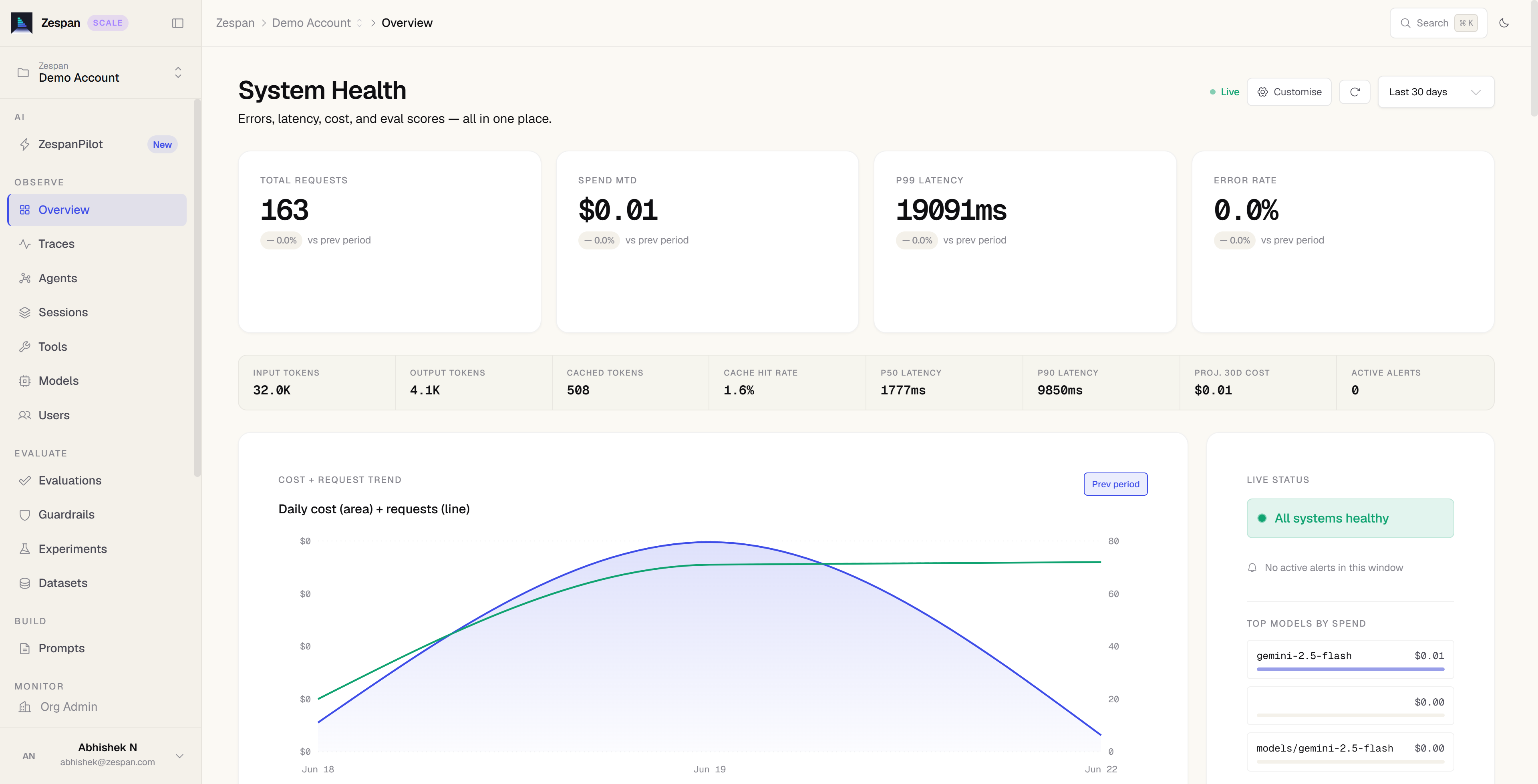
ADK エージェントが計測されると、Zespan プラットフォームは以下を提供します。
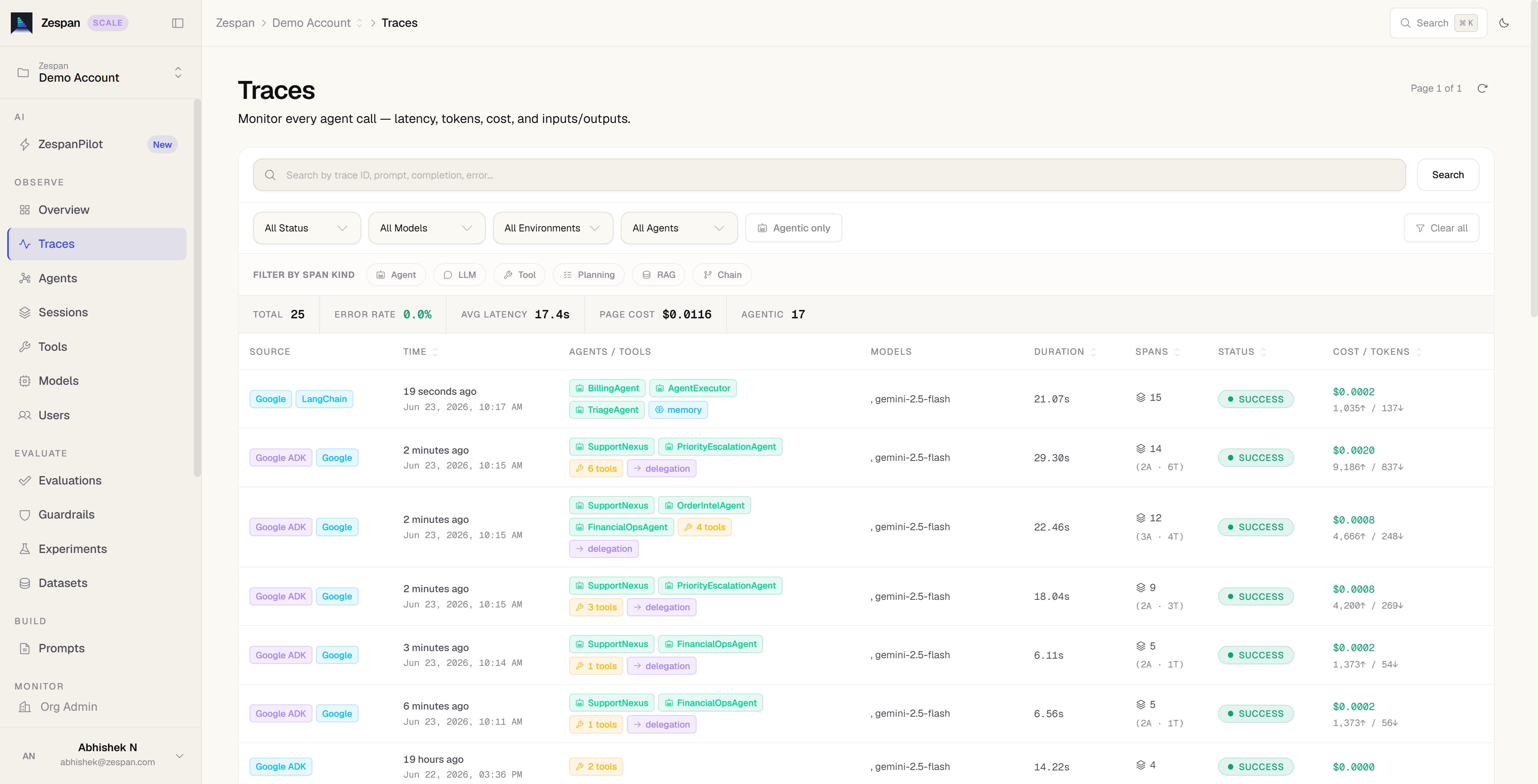
- トレース (Tracing): すべてのエージェント、モデル、ツール、および委譲スパンを、レイテンシ、トークン、およびコストとともにキャプチャします。
- コストの属性分け: モデル、エージェント、および期間ごとにかかったコストを分析します。
- 評価 (Evaluations): カスタムメトリクス、データセット、およびシミュレーションを使用して、エージェントの動作をスコアリングします。
- ガードレール (Guardrails): 実行時に安全でない入力および出力をブロック、編集、またはフラグ設定します。
- プロンプト管理: キャッシュと変数置換を使用して、プロンプトを取得し、バージョン管理します。
前提条件
始める前に、Zespan アカウントと認証情報を設定します。
- app.zespan.com でサインアップします。
- プロジェクトを作成し、Onboarding → API Key から API キー をコピーします。
- 環境変数を設定します。
インストール
ADK とともに Zespan SDK をインストールします。
トレースの送信
トレースのキャプチャを開始するために、Zespan SDK で ADK エージェントを計測します。
起動時に Zespan を 1 回初期化し、ZespanADKCallbackHandler を作成して、その .callbacks を LlmAgent に展開して渡します。
import asyncio
import os

import zespan
from zespan import ZespanADKCallbackHandler
from google.adk.agents import LlmAgent
from google.adk.runners import InMemoryRunner
from google.genai import types

zespan.init(api_key=os.environ["ZESPAN_API_KEY"])

handler = ZespanADKCallbackHandler()


def get_weather(city: str) -> dict:
    """Retrieves the current weather report for a specified city."""
    if city.lower() == "new york":
        return {
            "status": "success",
            "report": "The weather in New York is sunny with a temperature of 25°C.",
        }
    return {
        "status": "error",
        "error_message": f"Weather information for '{city}' is not available.",
    }


agent = LlmAgent(
    name="weather_agent",
    model="gemini-flash-latest",
    description="Agent to answer weather questions.",
    instruction="Use the available tools to find an answer.",
    tools=[get_weather],
    **handler.callbacks,
)


async def main():
    runner = InMemoryRunner(agent=agent, app_name="weather_app")
    await runner.session_service.create_session(
        app_name="weather_app", user_id="user", session_id="session"
    )
    async for event in runner.run_async(
        user_id="user",
        session_id="session",
        new_message=types.Content(
            role="user",
            parts=[types.Part(text="What is the weather in New York?")],
        ),
    ):
        if event.is_final_response():
            print(event.content.parts[0].text.strip())


if __name__ == "__main__":
    asyncio.run(main())
2 つのアプローチが利用可能です。
instrumentADK は、コーディネーターとランナーを 1 つの呼び出しでラップし、委譲を含む完全なイベントストリームをインターセプトします。
import { zespan, instrumentADK } from "@zespan/sdk";
import { LlmAgent, InMemoryRunner } from "@google/adk";

zespan.init({ apiKey: process.env.ZESPAN_API_KEY! });

function getWeather(city: string): object {
  if (city.toLowerCase() === "new york") {
    return {
      status: "success",
      report: "The weather in New York is sunny with a temperature of 25°C.",
    };
  }
  return {
    status: "error",
    error_message: `Weather information for '${city}' is not available.`,
  };
}

const coordinator = new LlmAgent({
  name: "weather_agent",
  model: "gemini-flash-latest",
  description: "Agent to answer weather questions.",
  instruction: "Use the available tools to find an answer.",
  tools: [getWeather],
});

const runner = new InMemoryRunner({
  agent: coordinator,
  appName: "weather_app",
});

const { runner: tracedRunner } = instrumentADK({ coordinator, runner });

for await (const event of tracedRunner.runEphemeral({
  userId: "user",
  newMessage: { parts: [{ text: "What is the weather in New York?" }] },
})) {
  if (event.isFinalResponse()) {
    console.log(event.content.parts[0].text);
  }
}
ZespanADKCallbackHandler は ADK ネイティブのコールバックシステムを使用します。エージェントの設定に .callbacks を展開して渡します。
import { zespan, ZespanADKCallbackHandler } from "@zespan/sdk";
import { LlmAgent, InMemoryRunner } from "@google/adk";

zespan.init({ apiKey: process.env.ZESPAN_API_KEY! });

const handler = new ZespanADKCallbackHandler();

const agent = new LlmAgent({
  name: "weather_agent",
  model: "gemini-flash-latest",
  description: "Agent to answer weather questions.",
  instruction: "Use the available tools to find an answer.",
  tools: [getWeather],
  ...handler.callbacks,
});

const runner = new InMemoryRunner({ agent, appName: "weather_app" });

for await (const event of runner.runEphemeral({
  userId: "user",
  newMessage: { parts: [{ text: "What is the weather in New York?" }] },
})) {
  if (event.isFinalResponse()) {
    console.log(event.content.parts[0].text);
  }
}
マルチエージェントシステム
Zespan は、コーディネーターとサブエージェントのスパンを 1 つのトレースにリンクします。
コーディネーターとすべてのサブエージェントで同じハンドラーインスタンスを使用します。スパンは、共有された ADK 呼び出し ID を介して 1 つのトレースの下にリンクされます。
instrumentADK を使用すると、すべての subAgents が再帰的かつ自動的にラップされます。
const specialist = new LlmAgent({
  name: "lookup_agent",
  model: "gemini-flash-latest",
  tools: [lookupTool],
});

const coordinator = new LlmAgent({
  name: "coordinator",
  model: "gemini-flash-latest",
  subAgents: [specialist],
});

const { runner: tracedRunner } = instrumentADK({
  coordinator,
  runner: new InMemoryRunner({ agent: coordinator, appName: "my_app" }),
});
ZespanADKCallbackHandler を使用する場合は、同じインスタンスをすべてのエージェントに展開して渡します。
const handler = new ZespanADKCallbackHandler();

const specialist = new LlmAgent({
  name: "lookup_agent",
  model: "gemini-flash-latest",
  tools: [lookupTool],
  ...handler.callbacks,
});

const coordinator = new LlmAgent({
  name: "coordinator",
  model: "gemini-flash-latest",
  subAgents: [specialist],
  ...handler.callbacks,
});
ダッシュボードでトレースを表示する
エージェントを実行し、app.zespan.com でプロジェクトを開きます。ADK の実行ごとに、以下を示す階層的なトレースが生成されます。
- コディネーターとサブエージェント間のレイテンシと委譲リンクを示すエージェントスパン
- トークン数、コスト、終了理由、およびオプションのプロンプト/補完テキストを含む LLM スパン
- 入力引数と戻り値を含むツールスパン